Open this in the pixkoz appGet the pixkoz app on Google PlayUse the pixkoz app
OpenGetOpen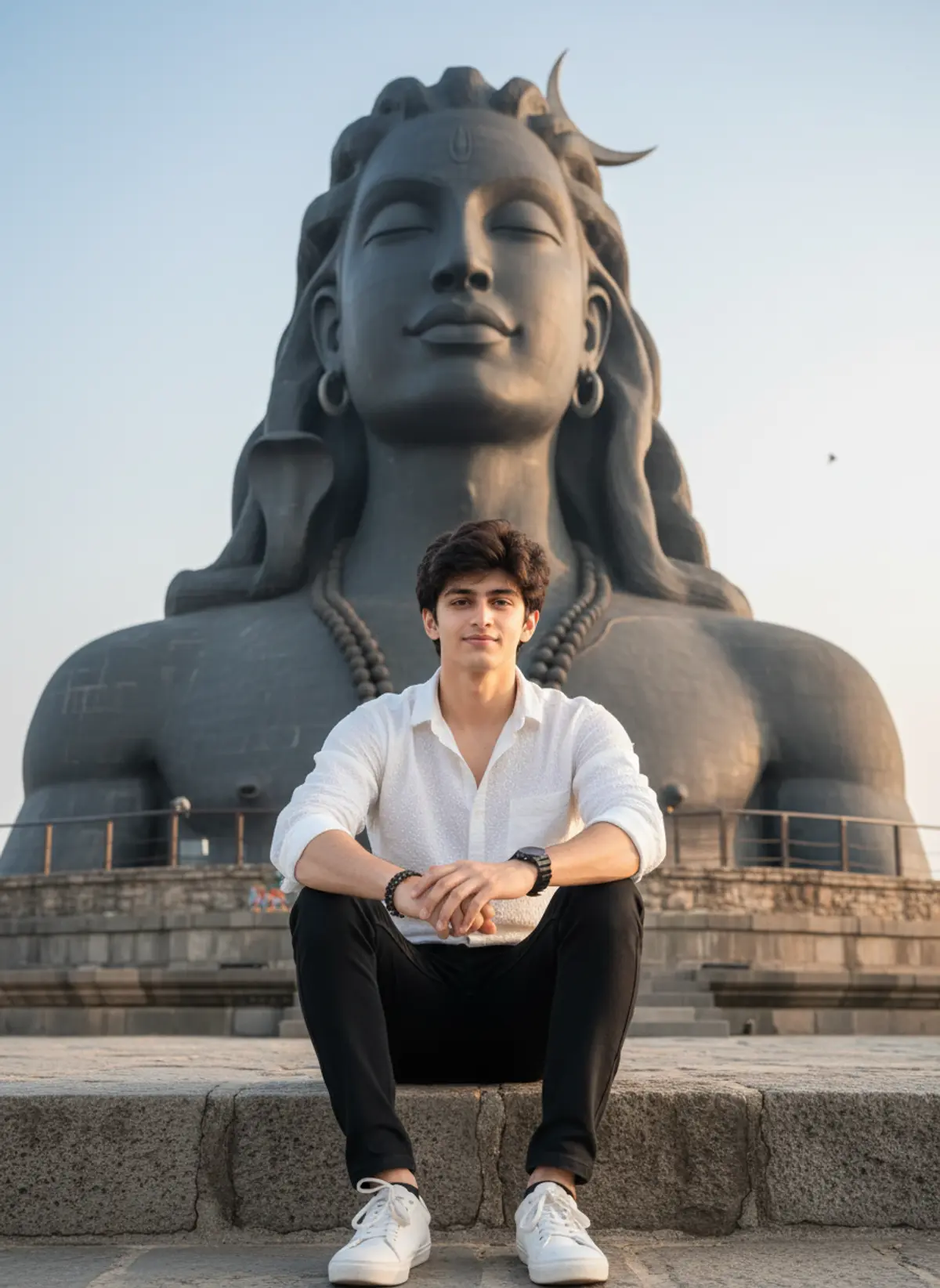
🕉️ Adiyogi Travel Portrait – Authentic Stone Temple
A realistic travel portrait capturing a relaxed seated moment before the majestic Adiyogi Shiva statue with natural daylight, authentic details, and professional DSLR photography. 📸
Copy this, then paste it with your photo in Gemini or ChatGPT
ChatGPT opens with your prompt filled in. In Gemini, paste it. Add your photo there and send.ChatGPT opens with your prompt filled in. In Gemini, long-press the box, tap Paste. Add your photo.
Prompt
Needs 1 photo
Use the uploaded image as the PRIMARY VISUAL REFERENCE. Preserve the exact recognizable facial identity, facial structure, hairstyle, skin tone, natural age and realistic body proportions of the subject. Recreate the same composition with the subject seated naturally on an old stone platform in front of the massive Adiyogi Shiva statue. Preserve the white textured button-up shirt with sleeves rolled up, black trousers, white sneakers, wrist accessories and relaxed seated posture with both hands resting naturally near the knees. Keep the enormous dark stone Shiva statue dominating the background, with its calm facial expression, closed eyes, crescent moon, long hair, earrings and large-scale sculptural details. Preserve the temple grounds, stone structures, open outdoor setting and soft daylight. Maintain realistic scale and perspective so the subject genuinely appears photographed at the location rather than digitally placed in front of the statue. Use natural outdoor daylight, realistic atmospheric depth, subtle background haze and authentic camera exposure. Keep natural skin pores, fine facial hair, individual hair strands, realistic fabric wrinkles, natural shoe texture and small environmental imperfections. Avoid excessive sharpness, artificial HDR or dramatic cinematic effects. The image should look like a genuine travel photograph captured with a professional DSLR/mirrorless camera, with realistic depth of field and restrained colour grading. The subject MUST look directly into the camera while maintaining the same relaxed seated pose. Prioritise authentic photography and realism over visual perfection.
Part of: Travel AI photo prompts
How to use this prompt
In Gemini
- Tap Copy prompt, or Open in Gemini, which copies it for you.
- In Gemini, add your photo with the + button.
- Paste the prompt into the message box and send.
In ChatGPT
- Tap Open in ChatGPT: it opens with the prompt filled in (it is copied too, in case you need to paste it).
- Attach your photo with the + button.
- Send, and wait for your picture.
Gemini se kaise banaye: photo upload karo, prompt paste karo, send dabao.
Questions people ask
Is this prompt free?
Yes. Copy it and use it in Gemini, ChatGPT or another AI photo app as often as you like. You don't need a pixkoz account to copy it.
Will it work on my photo?
It works best with a clear, front-facing photo in good light, with the face fully visible. AI results vary from one try to the next: if a detail is off, try again.
Gemini or ChatGPT: which is better for this?
Both can use it. The examples on this page were made with Google: Nano Banana (Gemini 2.5 Flash Image), the model behind Gemini's images, so Gemini comes closest to them; ChatGPT gives its own take on the same prompt.
What happens to my photo?
When you use the prompt in Gemini or ChatGPT, your photo goes to that app, not to pixkoz, and that app's own privacy terms apply.