Open this in the pixkoz appGet the pixkoz app on Google PlayUse the pixkoz app
OpenGetOpen
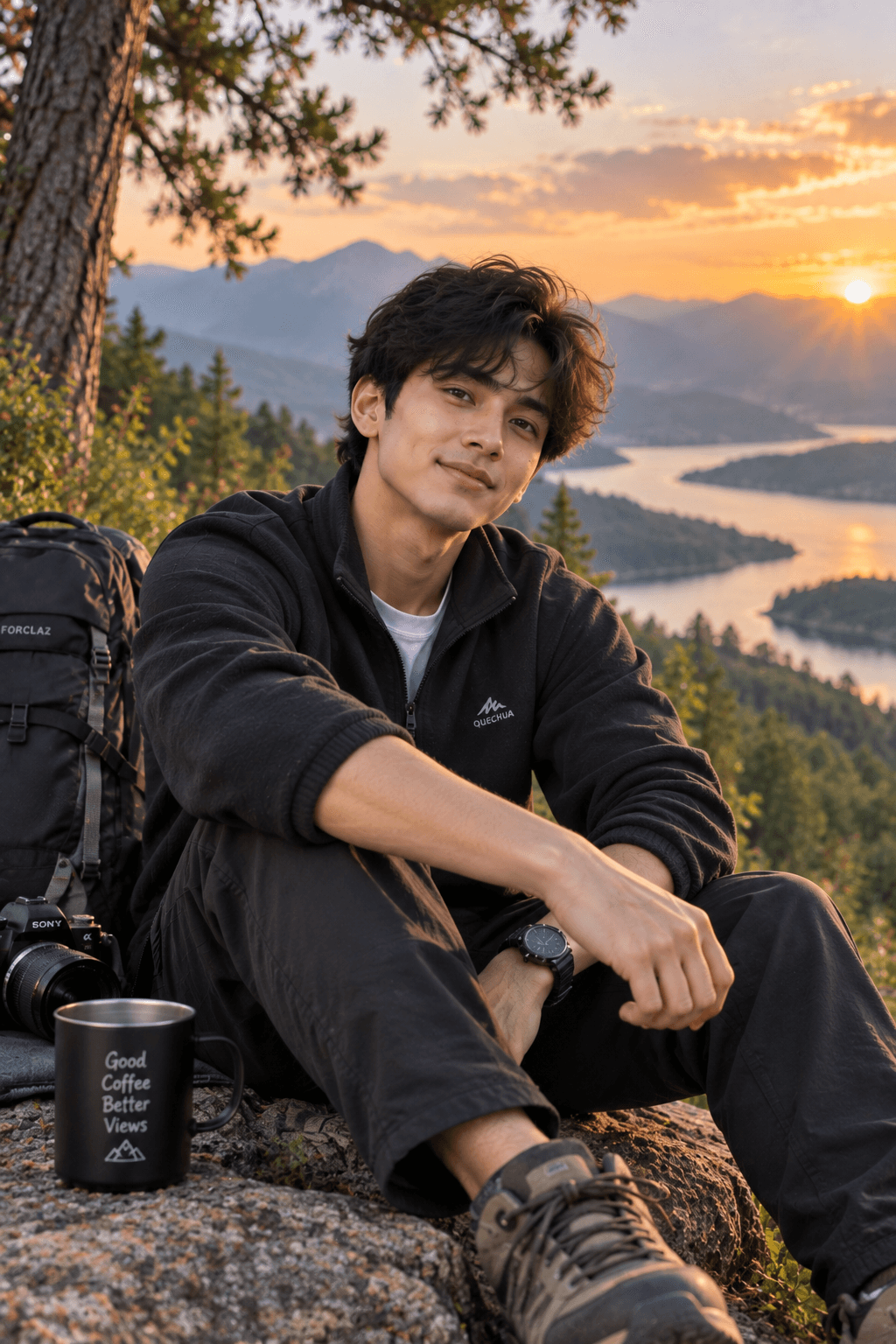
Misty Mountain Travel Portrait
A cinematic monsoon travel portrait preserving the man’s exact facial identity while capturing a joyful open-arm pose, misty green mountains, distant waterfall, and atmospheric blue-grey skies.
Copy this, then paste it with your photo in Gemini or ChatGPT
ChatGPT opens with your prompt filled in. In Gemini, paste it. Add your photo there and send.ChatGPT opens with your prompt filled in. In Gemini, long-press the box, tap Paste. Add your photo.
Prompt
Needs 1 photo
STRICT FACIAL IDENTITY LOCK — HIGHEST PRIORITY Use the uploaded reference image as the ONLY and EXCLUSIVE facial identity reference for the man. The uploaded reference image is the definitive source for his face and recognizable identity. Preserve his exact recognizable facial identity with maximum possible identity fidelity. Preserve precisely: Exact face shape and overall facial proportions Forehead and natural hairline Eyebrow shape, thickness, and placement Eye shape, size, spacing, and natural eyelid structure Nose shape, bridge, tip, and proportions Lips and natural mouth shape Cheekbones and cheek structure Jawline and chin shape Ears and their natural proportions Natural skin tone, complexion, and texture Exact moustache appearance, density, shape, and pattern Natural facial asymmetry and small real-world imperfections Authentic apparent age and distinctive facial characteristics Overall facial structure and recognizable appearance Do not generate a generic or similar-looking male face. Do not replace, reinterpret, blend, beautify, reshape, redesign, smooth, symmetrize, age, de-age, or otherwise modify the facial identity from the uploaded reference image. Do not alter his natural facial proportions or moustache pattern. Preserve authentic skin texture rather than applying artificial beauty retouching. The uploaded reference image controls ONLY the man’s facial identity. His clothing, pose, body position, environment, mountain landscape, railing, lighting, camera perspective, photography style, and every other visual element must follow the original prompt exactly as written below. Identity verification requirement: Before finalizing, ensure the generated face remains clearly recognizable as the same man from the uploaded reference image, with consistent facial structure, feature relationships, moustache, skin tone, natural asymmetry, and distinctive characteristics. DO NOT CHANGE ANY OTHER DETAIL OF THE ORIGINAL PROMPT. Create an ultra-realistic, high-resolution cinematic travel portrait based closely on the uploaded reference image. Preserve the person’s exact facial identity, facial structure, proportions, natural skin tone, hairstyle, moustache, and recognizable appearance. Strict identity lock — do not alter, beautify, reshape, or redesign the face. The man is standing confidently at a scenic mountain viewpoint during monsoon, surrounded by lush green hills covered in soft mist and fog. He is facing slightly toward the side with both arms stretched wide and palms open, creating a relaxed, joyful travel moment. Outfit: pink crew-neck T-shirt with three thin white horizontal stripes across the chest, dark navy athletic shorts, and dark blue sporty sneakers. Keep the outfit and overall pose faithful to the reference. Include the metal safety railing, misty green valley, distant waterfall, and overcast blue-grey sky. Natural diffused monsoon lighting, realistic atmospheric haze, subtle depth of field, authentic skin texture, realistic fabric details, natural body proportions. Photography: professional travel photography, full-body composition, eye-level perspective, 35mm lens look, crisp subject, soft background separation, realistic colors, HDR-like dynamic range, cinematic but natural grading, ultra-detailed, photorealistic, 4K quality. No artificial beauty filter, no excessive sharpening, no face alteration, no extra fingers or limbs.
How to use this prompt
In Gemini
- Tap Copy prompt, or Open in Gemini, which copies it for you.
- In Gemini, add your photo with the + button.
- Paste the prompt into the message box and send.
In ChatGPT
- Tap Open in ChatGPT: it opens with the prompt filled in (it is copied too, in case you need to paste it).
- Attach your photo with the + button.
- Send, and wait for your picture.
Gemini se kaise banaye: photo upload karo, prompt paste karo, send dabao.
Questions people ask
Is this prompt free?
Yes. Copy it and use it in Gemini, ChatGPT or another AI photo app as often as you like. You don't need a pixkoz account to copy it.
Will it work on my photo?
It works best with a clear, front-facing photo in good light, with the face fully visible. AI results vary from one try to the next: if a detail is off, try again.
Gemini or ChatGPT: which is better for this?
Both can use it. The examples on this page were made with Google: Nano Banana (Gemini 2.5 Flash Image), the model behind Gemini's images, so Gemini comes closest to them; ChatGPT gives its own take on the same prompt.
What happens to my photo?
When you use the prompt in Gemini or ChatGPT, your photo goes to that app, not to pixkoz, and that app's own privacy terms apply.