Open this in the pixkoz appGet the pixkoz app on Google PlayUse the pixkoz app
OpenGetOpen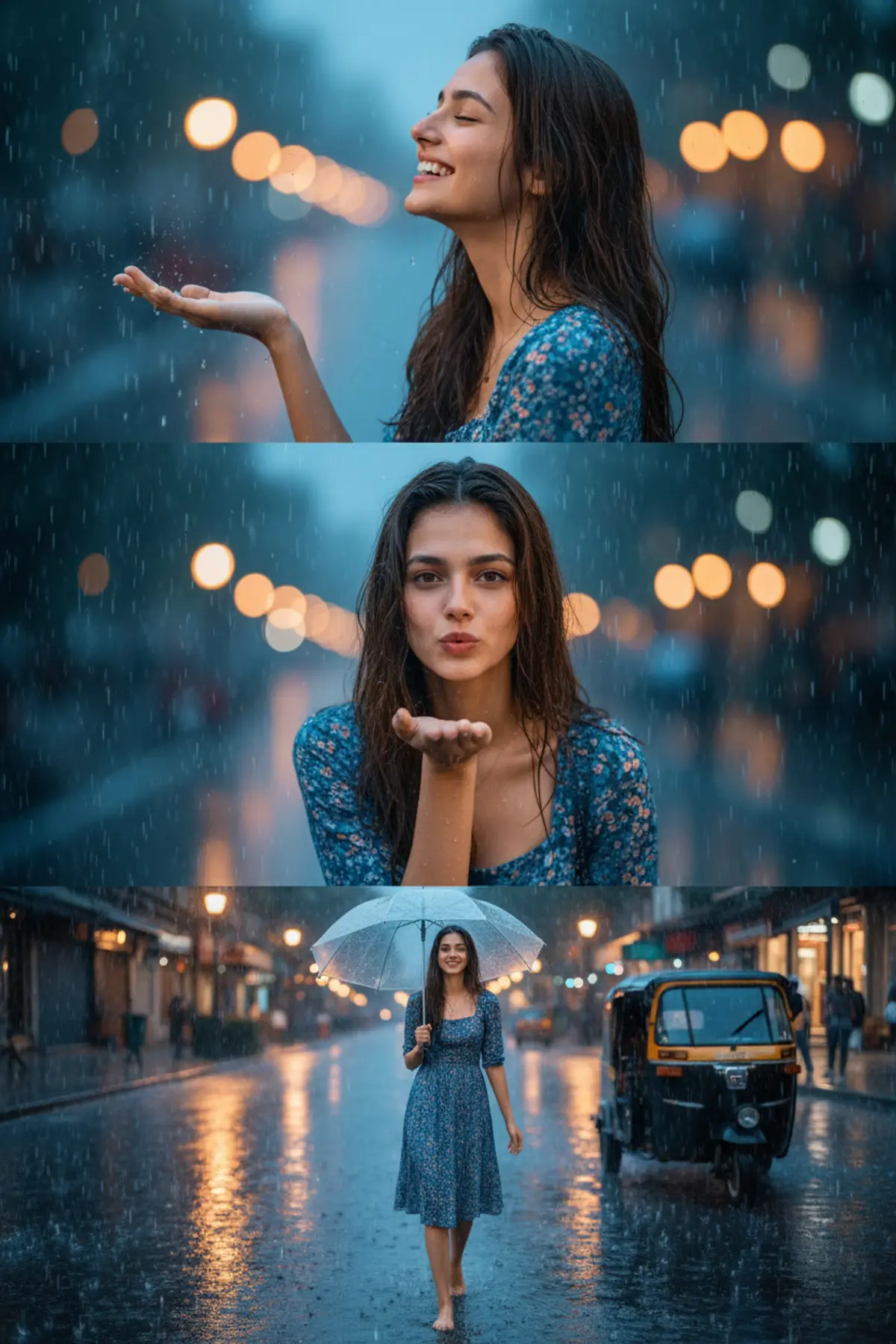
Monsoon Dreams — Cinematic Rainy Evening Portrait
A dreamy three-part Indian monsoon portrait capturing joyful rain-soaked moments, playful emotion, glowing city lights, wet-road reflections, and cinematic evening atmosphere while preserving the woman’s exact identity throughout.
Copy this, then paste it with your photo in Gemini or ChatGPT
ChatGPT opens with your prompt filled in. In Gemini, paste it. Add your photo there and send.ChatGPT opens with your prompt filled in. In Gemini, long-press the box, tap Paste. Add your photo.
Prompt
Needs 1 photo
Use the uploaded image as the main visual reference. Create a cinematic, dreamy monsoon-themed portrait collage of a young Indian woman enjoying a rainy evening in a lively city street. Preserve the same facial identity, facial features, hairstyle, natural skin texture, and overall appearance of the woman throughout all three visual moments. Top section: A close-up side-profile portrait of the woman standing in the rain, her wet hair naturally framing her face. She looks upward with her eyes gently closed and a joyful open smile, one hand raised to feel the falling raindrops. Middle section: A centered close-up portrait of the same woman with wet, naturally tousled hair, wearing a blue floral dress. She gently blows a playful kiss toward the camera with one hand near her lips. Bottom section: A full-body cinematic street scene of the same woman walking barefoot through a rain-soaked city street while holding a transparent umbrella. She wears the same blue floral dress. Reflections from streetlights shimmer across the wet road, with a parked black-and-yellow auto-rickshaw visible on the side. Use heavy natural rainfall, glowing city bokeh, wet-road reflections, soft warm streetlights, cool blue evening tones, atmospheric mist, and realistic water droplets. Blend all three moments smoothly into one premium vertical cinematic composition. Style: photorealistic Indian monsoon photography, cinematic storytelling, emotional and joyful mood, realistic wet hair and fabric, natural skin texture, shallow depth of field, dramatic night lighting, detailed rain particles, realistic reflections, premium editorial photography, 4K/8K, vertical poster composition. Important: Keep the woman’s identity consistent in every section. Avoid artificial facial changes, excessive skin smoothing, distorted hands/fingers, unrealistic rain, or cartoon-like effects.
How to use this prompt
In Gemini
- Tap Copy prompt, or Open in Gemini, which copies it for you.
- In Gemini, add your photo with the + button.
- Paste the prompt into the message box and send.
In ChatGPT
- Tap Open in ChatGPT: it opens with the prompt filled in (it is copied too, in case you need to paste it).
- Attach your photo with the + button.
- Send, and wait for your picture.
Gemini se kaise banaye: photo upload karo, prompt paste karo, send dabao.
Questions people ask
Is this prompt free?
Yes. Copy it and use it in Gemini, ChatGPT or another AI photo app as often as you like. You don't need a pixkoz account to copy it.
Will it work on my photo?
It works best with a clear, front-facing photo in good light, with the face fully visible. AI results vary from one try to the next: if a detail is off, try again.
Gemini or ChatGPT: which is better for this?
Both can use it. The examples on this page were made with Google: Nano Banana 2 (Gemini 3.1 Flash Image), the model behind Gemini's images, so Gemini comes closest to them; ChatGPT gives its own take on the same prompt.
What happens to my photo?
When you use the prompt in Gemini or ChatGPT, your photo goes to that app, not to pixkoz, and that app's own privacy terms apply.