Open this in the pixkoz appGet the pixkoz app on Google PlayUse the pixkoz app
OpenGetOpen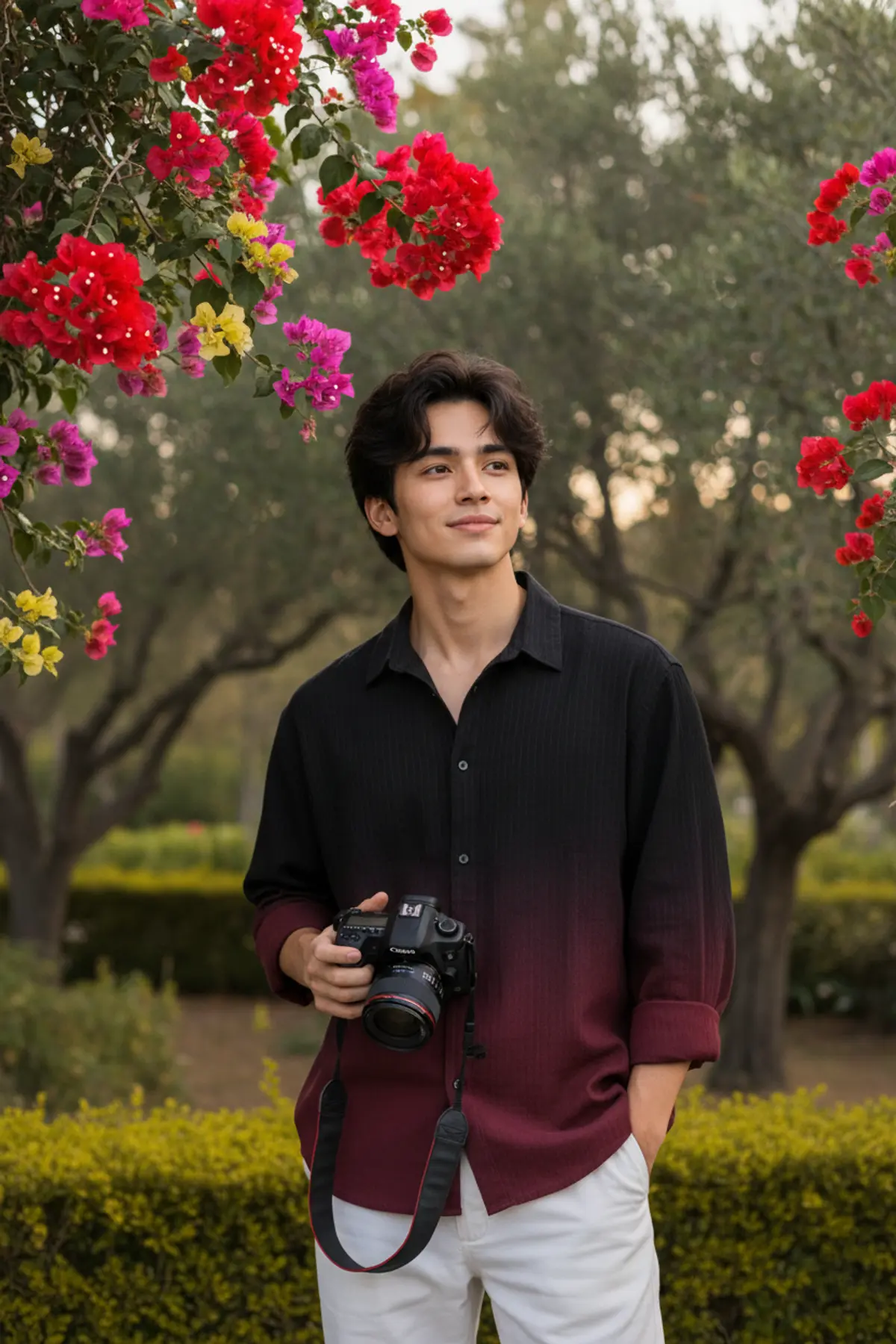
Garden Gentleman — Maroon Gradient Editorial
A sophisticated outdoor fashion portrait preserving the subject’s recognizable identity while combining a black-to-deep-maroon shirt, crisp white trousers, DSLR styling, and lush garden elegance.
Copy this, then paste it with your photo in Gemini or ChatGPT
ChatGPT opens with your prompt filled in. In Gemini, paste it. Add your photo there and send.ChatGPT opens with your prompt filled in. In Gemini, long-press the box, tap Paste. Add your photo.
Prompt
Needs 1 photo
Use the uploaded reference photo as the identity reference. Preserve the person's recognizable facial identity, facial structure, hairstyle and natural skin texture accurately. Ultra realistic DSLR photograph of a stylish young man standing naturally in a lush outdoor garden, photographed as a premium real-life fashion portrait. Use the uploaded reference image as the visual reference for his facial appearance, hairstyle, skin tone and overall natural look. Keep his appearance consistent with the reference while maintaining realistic photographic details. Face must look completely natural and ultra realistic with real skin texture, visible pores and subtle imperfections. He has naturally voluminous dark hair with realistic individual strands and a neat modern hairstyle. He is wearing a loose black-to-deep-maroon gradient button-up shirt with subtle vertical fabric texture. The upper portion is black and gradually transitions into deep maroon toward the lower section. The collar is naturally open and the sleeves are casually rolled up, revealing maroon cuffs. He wears relaxed clean white trousers. The subject stands slightly right of center with his shoulders naturally angled toward the camera. His face is mostly directed toward the camera with a gentle natural smile, while his eyes gaze softly toward the upper-right, creating a relaxed candid moment. His left hand rests casually inside his trouser pocket. His right hand naturally holds a professional DSLR camera around the lower chest/waist area. The camera strap hangs naturally in a loose loop. Keep the camera, lens, strap, hands and fingers anatomically realistic. Vertical 4:5 composition, framed from head to waist without making the image an extreme close-up. Keep the face clearly visible and unobstructed, with enough surrounding garden visible to establish the location. The garden background should remain elegant and uncluttered. Place the main flowers only around the upper-left portion of the frame as hanging bougainvillea branches. Include a prominent red flower cluster in the upper-left corner with smaller pink, magenta, yellow and deep-purple flowers naturally mixed into the hanging branches. Add only a small red flower branch toward the upper-right. Do not cover the entire background with flowers. Behind the subject, show softly rendered olive-green trees, leaves and natural garden foliage. Add a warm yellow-green hedge and a few leaves across the lower foreground for realistic depth. Maintain a natural DSLR optical separation between the subject and distant foliage. Use soft warm natural daylight filtering through the garden trees. Create gentle highlights on the hair, face and shirt with natural soft shadows. Keep the overall color palette muted olive green, dark green and warm yellow-green with subtle maroon and red accents. Natural skin tones, restrained saturation, realistic exposure and gentle warm highlights. Professional outdoor portrait photography, realistic DSLR rendering, natural perspective, authentic fabric texture, detailed hair strands, realistic camera materials, natural hand anatomy, subtle film grain and premium photographic quality. Avoid artificial skin, excessive retouching, exaggerated colors, harsh contrast, distorted anatomy, extra fingers, duplicated objects, unrealistic camera proportions, CGI appearance, excessive HDR or fantasy effects. shot on Canon EOS R5 85mm lens, f/1.8, photorealistic --ar 4:5
How to use this prompt
In Gemini
- Tap Copy prompt, or Open in Gemini, which copies it for you.
- In Gemini, add your photo with the + button.
- Paste the prompt into the message box and send.
In ChatGPT
- Tap Open in ChatGPT: it opens with the prompt filled in (it is copied too, in case you need to paste it).
- Attach your photo with the + button.
- Send, and wait for your picture.
Gemini se kaise banaye: photo upload karo, prompt paste karo, send dabao.
Questions people ask
Is this prompt free?
Yes. Copy it and use it in Gemini, ChatGPT or another AI photo app as often as you like. You don't need a pixkoz account to copy it.
Will it work on my photo?
It works best with a clear, front-facing photo in good light, with the face fully visible. AI results vary from one try to the next: if a detail is off, try again.
Gemini or ChatGPT: which is better for this?
Both can use it. The examples on this page were made with Google: Nano Banana (Gemini 2.5 Flash Image), the model behind Gemini's images, so Gemini comes closest to them; ChatGPT gives its own take on the same prompt.
What happens to my photo?
When you use the prompt in Gemini or ChatGPT, your photo goes to that app, not to pixkoz, and that app's own privacy terms apply.