Open this in the pixkoz appGet the pixkoz app on Google PlayUse the pixkoz app
OpenGetOpen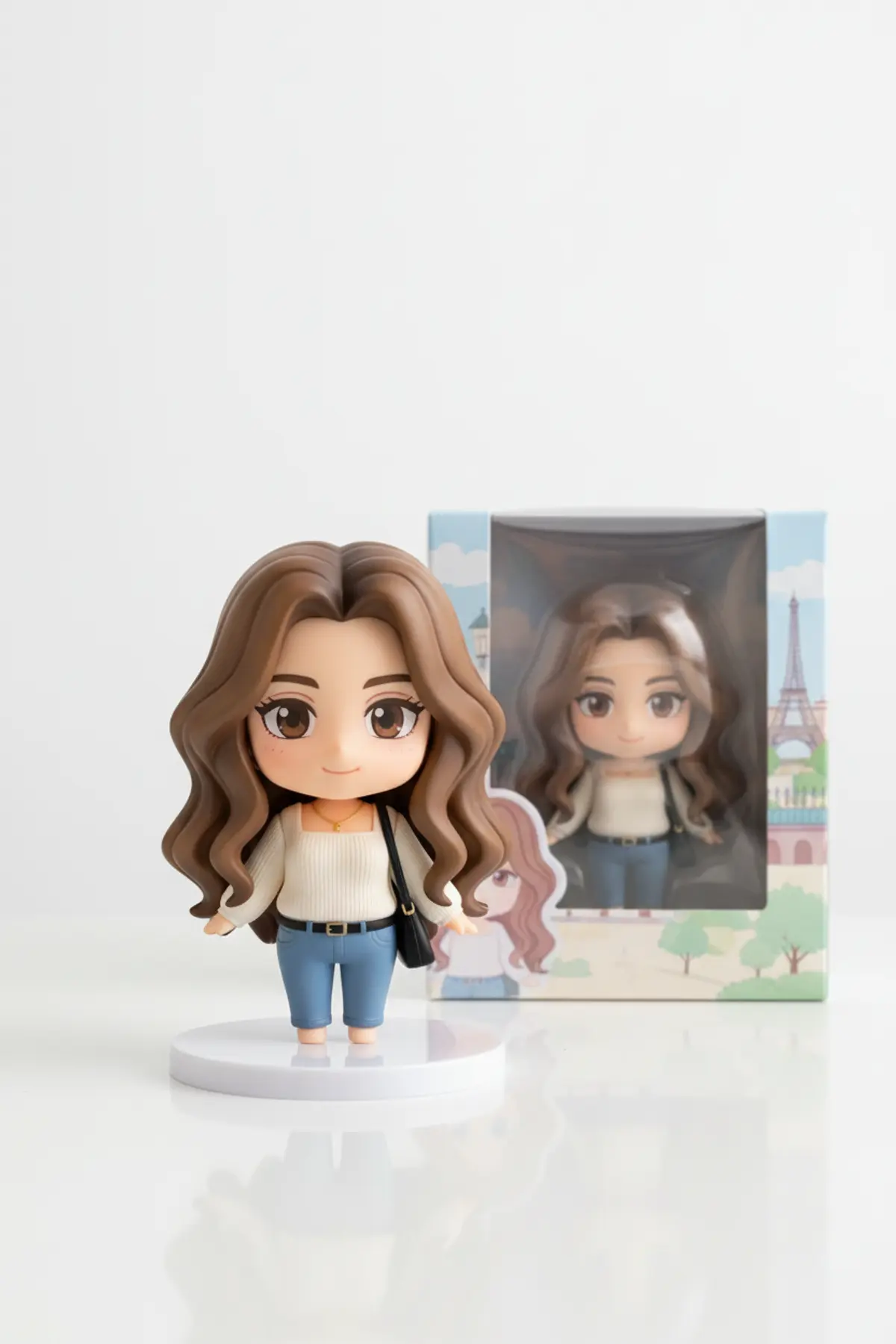

Mini Collectible Figure of You
Turns your photo into a cute big-head collectible figure on a round stand, next to its own window display box.
Copy this, then paste it with your photo in Gemini or ChatGPT
ChatGPT opens with your prompt filled in. In Gemini, paste it. Add your photo there and send.ChatGPT opens with your prompt filled in. In Gemini, long-press the box, tap Paste. Add your photo.
Prompt
Needs 1 photo
Turn the person in the uploaded photo into a small 3D collectible figure. The figure must still clearly look like them: same facial features, face shape, skin tone, hair colour and hairstyle, same outfit and colours as in the photo, simplified into the figure style. Do not change their age or gender. Figure style: chibi proportions, an oversized head, large expressive eyes, a small rounded body, a friendly smile; smooth, slightly glossy toy-like surfaces in a soft pastel palette. Scene: the figure stands on a round plain display base on a clean white tabletop. Next to it stands a glossy collector's box with a clear plastic window, its artwork showing the same figure; no readable words on the box. Light and camera: bright soft studio light, plain white background, gentle shadows under the base; macro lens look with shallow depth of field, sharp focus on the figure's face. Mood: playful and collectible. Photorealistic product photo, no text, no logo, no watermark.
How to use this prompt
In Gemini
- Tap Copy prompt, or Open in Gemini, which copies it for you.
- In Gemini, add your photo with the + button.
- Paste the prompt into the message box and send.
In ChatGPT
- Tap Open in ChatGPT: it opens with the prompt filled in (it is copied too, in case you need to paste it).
- Attach your photo with the + button.
- Send, and wait for your picture.
Gemini se kaise banaye: photo upload karo, prompt paste karo, send dabao.
Questions people ask
Is this prompt free?
Yes. Copy it and use it in Gemini, ChatGPT or another AI photo app as often as you like. You don't need a pixkoz account to copy it.
Will it work on my photo?
It works best with a clear, front-facing photo in good light, with the face fully visible. AI results vary from one try to the next: if a detail is off, try again.
Gemini or ChatGPT: which is better for this?
Both can use it. The examples on this page were made with Google: Nano Banana (Gemini 2.5 Flash Image), the model behind Gemini's images, so Gemini comes closest to them; ChatGPT gives its own take on the same prompt.
What happens to my photo?
When you use the prompt in Gemini or ChatGPT, your photo goes to that app, not to pixkoz, and that app's own privacy terms apply.