Open this in the pixkoz appGet the pixkoz app on Google PlayUse the pixkoz app
OpenGetOpen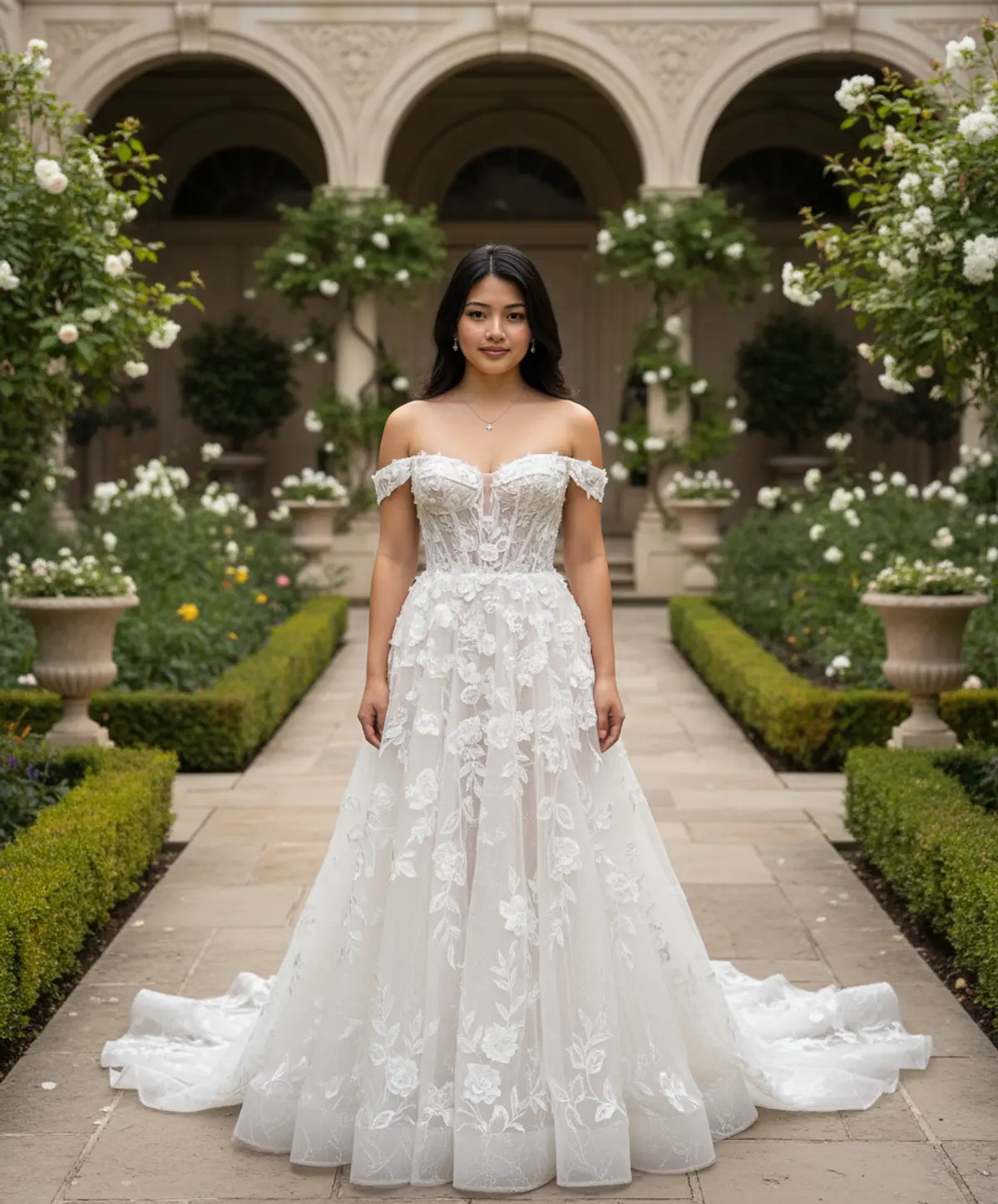

Enchanted Garden Bride
A timeless bridal portrait transforming the uploaded woman into an elegant couture bride surrounded by lush greenery, white flowers, and romantic classical garden architecture.
Copy this, then paste it with your photo in Gemini or ChatGPT
ChatGPT opens with your prompt filled in. In Gemini, paste it. Add your photo there and send.ChatGPT opens with your prompt filled in. In Gemini, long-press the box, tap Paste. Add your photo.
Prompt
Needs 1 photo
Use the uploaded woman’s personal photo as the PRIMARY IDENTITY REFERENCE and the provided bridal image as the PRIMARY VISUAL, DRESS, POSE, LIGHTING, AND ENVIRONMENT REFERENCE. Preserve the uploaded woman’s exact recognizable facial identity without changing or beautifying her facial features. Maintain her original face shape, eyes, eyebrows, nose, lips, jawline, cheek structure, skin tone, age, and other distinctive facial characteristics. Do not replace, redesign, reshape, or morph her face. Keep her natural identity clearly recognizable and realistically integrated into the new scene. Transform the woman into an elegant luxury garden bride, while keeping her face and natural body proportions faithful to the uploaded photo. Dress her in a sophisticated ivory-white couture wedding gown inspired by the reference image: an elegant off-shoulder neckline, fitted structured bodice, delicate three-dimensional white floral appliqué and lace embroidery across the neckline and bodice, subtle sheer detailing, a graceful flowing A-line skirt, layered translucent ivory fabric, intricate floral embroidery cascading naturally down the skirt, and a long soft train extending across the garden pathway. Preserve the luxurious fabric texture, delicate lacework, floral details, and romantic silhouette of the reference dress. Place her standing gracefully in a luxurious classical garden courtyard similar to the reference: lush green foliage surrounding the pathway, abundant white flowering plants, climbing greenery, elegant cream-colored architectural arches and columns, manicured plants, subtle decorative garden elements, and a sophisticated European-inspired courtyard atmosphere. Keep the overall background composition and visual feeling similar to the reference image, while naturally adapting the environment around the uploaded woman. Use an elegant full-body composition with the woman standing naturally and confidently, facing slightly toward the camera while keeping her face clearly visible. Soft diffused daylight illuminates her face and gown, creating delicate highlights on the embroidery and translucent fabric. Add realistic shadows, subtle depth, natural reflections, and gentle background blur. Extremely important: Preserve the uploaded person's facial identity with maximum accuracy. No face swapping, no facial reconstruction, no generic AI face, no changes to facial proportions, no excessive makeup, no age change, and no loss of recognizable features. Keep realistic skin texture, natural facial details, authentic anatomy and realistic hands. The final image should look like a professionally photographed version of the same woman wearing the reference wedding dress in the reference garden, rather than a different person. Style: photorealistic luxury bridal photography, high-end fashion editorial, realistic skin texture, intricate couture details, natural colors, elegant cinematic lighting, soft depth of field, premium wedding photography, ultra-detailed, realistic proportions, sophisticated romantic atmosphere, 85mm portrait photography.
How to use this prompt
In Gemini
- Tap Copy prompt, or Open in Gemini, which copies it for you.
- In Gemini, add your photo with the + button.
- Paste the prompt into the message box and send.
In ChatGPT
- Tap Open in ChatGPT: it opens with the prompt filled in (it is copied too, in case you need to paste it).
- Attach your photo with the + button.
- Send, and wait for your picture.
Gemini se kaise banaye: photo upload karo, prompt paste karo, send dabao.
Questions people ask
Is this prompt free?
Yes. Copy it and use it in Gemini, ChatGPT or another AI photo app as often as you like. You don't need a pixkoz account to copy it.
Will it work on my photo?
It works best with a clear, front-facing photo in good light, with the face fully visible. AI results vary from one try to the next: if a detail is off, try again.
Gemini or ChatGPT: which is better for this?
Both can use it. The examples on this page were made with Google: Nano Banana (Gemini 2.5 Flash Image), the model behind Gemini's images, so Gemini comes closest to them; ChatGPT gives its own take on the same prompt.
What happens to my photo?
When you use the prompt in Gemini or ChatGPT, your photo goes to that app, not to pixkoz, and that app's own privacy terms apply.