Open this in the pixkoz appGet the pixkoz app on Google PlayUse the pixkoz app
OpenGetOpen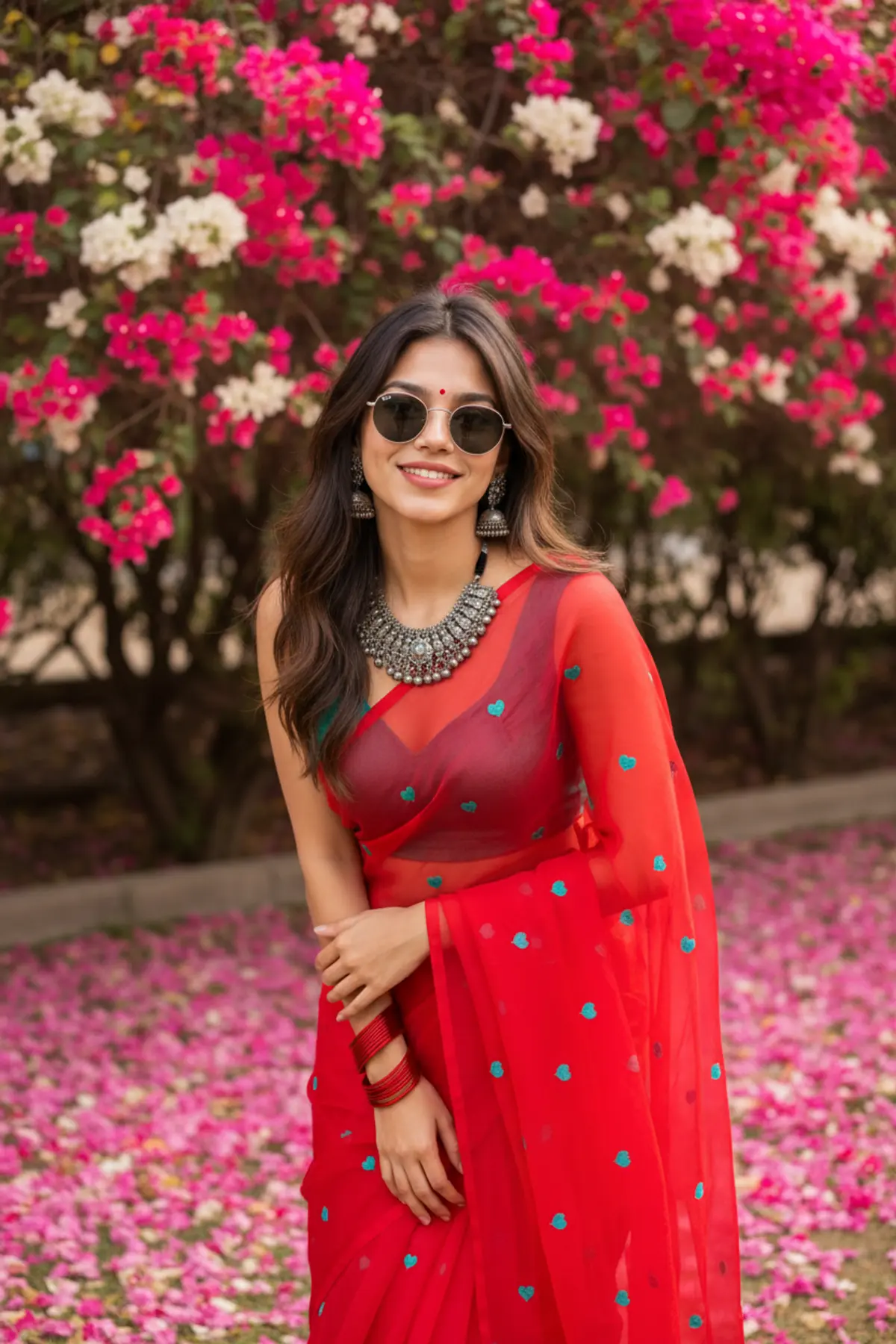
Bougainvillea Bloom — Vibrant Red & Teal Ethnic Fashion Portrait
A vibrant 9:16 South Asian fashion portrait preserving the subject’s exact identity while showcasing a striking red translucent sari, teal accents, oxidized silver jewelry, lush bougainvillea, and dreamy 85mm bokeh.
Copy this, then paste it with your photo in Gemini or ChatGPT
ChatGPT opens with your prompt filled in. In Gemini, paste it. Add your photo there and send.ChatGPT opens with your prompt filled in. In Gemini, long-press the box, tap Paste. Add your photo.
Prompt
Needs 1 photo
aspect ratio 9:16 , Keep the person exactly as shown in the reference image with 100% identical facial features, bone structure, 4K details, has perfect facial details as reference image, { "category": "portrait_creator", "category_reasoning": "The image features a styled individual posing for the camera with an influencer or social media creator aesthetic.", "adaptable": "subject", "subject": "Young woman leaning slightly forward, posing gracefully with a gentle smile.", "subject_details": "Mid-20s, long wavy brown hair, wearing a vibrant red translucent sari with small teal heart motifs, teal blouse, heavy oxidized silver layered necklace and jhumka earrings, red bangles, round dark sunglasses, slightly smooth red lipstick, small red bindi.", "setting": "Outdoor garden or pathway, soft daytime illumination.", "setting_details": "Large blooming bougainvillea bushes in the background with bright pink and white flowers, thick bed of fallen pink petals on the ground.", "composition": "Medium shot, waist-up framing, centered subject leaning slightly left, extremely shallow depth of field isolating the subject, deep background.", "camera": "Eye-level perspective, medium telephoto lens compression, very shallow depth of field with smooth circular bokeh.", "lighting": "Soft diffused daylight, omnidirectional open shade, low contrast, soft shadow density, even facial illumination.", "color_grade": "High-saturation, warm-leaning, vibrant reds and pinks, pushed magenta hues.", "color_palette": "Bright red, hot pink, teal, warm beige, black.", "style": "Instagram creator portrait, South Asian ethnic fashion, vibrant lifestyle aesthetic.", "mood": "Cheerful, vibrant, elegant.", "textures_materials": "Sheer chiffon fabric, metallic oxidized silver, smooth glass lenses, soft flower petals, matte skin.", "post_processing": "Skin softening beauty retouching, high saturation enhancement, sharp edge contrast on the subject.", "recreation_prompt": "Young woman with long wavy brown hair wearing a red translucent sari with small teal motifs and a teal blouse, heavy oxidized silver layered necklace and jhumka earrings, red bangles, round dark sunglasses, slightly smooth red lipstick, bindi, leaning slightly forward with a gentle smile, medium shot, eye-level angle, extremely shallow depth of field, set against a bright outdoor background of pink and white bougainvillea bushes with fallen pink petals on the ground, soft diffused daylight, high-saturation color grade, vibrant reds and pinks, Instagram creator aesthetic, shot on 85mm f/1.4, smooth circular bokeh, sharp subject focus, smooth skin.", "adaptation_prompt": "[YOUR SUBJECT — describe yourself: appearance, outfit, pose], leaning slightly forward with a gentle smile, medium shot, eye-level angle, extremely shallow depth of field, set against a bright outdoor background of pink and white bougainvillea bushes with fallen pink petals on the ground, soft diffused daylight, high-saturation color grade, vibrant reds and pinks, Instagram creator aesthetic, shot on 85mm f/1.4, smooth circular bokeh, sharp subject focus, smooth skin.", "negative_prompt": "distorted features, bad hands, harsh shadows, overexposed highlights, dull colors, deep depth of field, cluttered background.", "color_science": "Vibrant high-saturation profile + warm skin tone preservation + pushed reds and magentas + neutral soft highlights + lifted shadows.", "filter_name": "Social Media Vibrancy & Beauty Filter", "filter_description": "Skin smoothing beauty filter with high global saturation targeting warm tones, enhanced midtone contrast, and flawless matte skin rendering.", "white_balance": "Daylight", "color_temperature": "Warm (~5500K)", "tone_curve": "S-curve with lifted shadows and protected soft highlights.", "dynamic_range": "Standard digital dynamic range with compressed shadow details.", "highlight_rendering": "Soft, diffused, neutral white.", "shadow_rendering": "Soft, low-density, slightly warm bias.", "camera_rendering": "High-resolution digital sensor.", "lens_rendering": "Fast telephoto portrait lens, extreme background separation, smooth circular bokeh, low distortion.", "noise_profile": "Clean, low ISO, no digital noise.", "grain_profile": "Zero visible grain.", "sharpness_profile": "High edge sharpness on subject, rapid focus falloff.", "retouching_analysis": "Moderate beauty retouching, frequency separation skin softening, selective color saturation.", "portrait_analysis": "Posed creator portrait with styled wardrobe and accessories.", "facial_expression": "Gentle, closed-mouth smile.", "micro_expression": "Relaxed jaw, slight cheek lift indicating a genuine smile underneath the sunglasses.", "skin_rendering": "Smooth, matte finish, flawless, softened pores.", "hair_rendering": "Soft, voluminous, separated wavy strands catching diffuse ambient light.", "lighting_analysis": "Open shade daytime providing soft, omnidirectional wrap, no hard directional key, zero harsh shadows.", "visual_style_analysis": "Vibrant Pinterest aesthetic, Ethnic Fashion Influencer Portrait." }
How to use this prompt
In Gemini
- Tap Copy prompt, or Open in Gemini, which copies it for you.
- In Gemini, add your photo with the + button.
- Paste the prompt into the message box and send.
In ChatGPT
- Tap Open in ChatGPT: it opens with the prompt filled in (it is copied too, in case you need to paste it).
- Attach your photo with the + button.
- Send, and wait for your picture.
Gemini se kaise banaye: photo upload karo, prompt paste karo, send dabao.
Questions people ask
Is this prompt free?
Yes. Copy it and use it in Gemini, ChatGPT or another AI photo app as often as you like. You don't need a pixkoz account to copy it.
Will it work on my photo?
It works best with a clear, front-facing photo in good light, with the face fully visible. AI results vary from one try to the next: if a detail is off, try again.
Gemini or ChatGPT: which is better for this?
Both can use it. The examples on this page were made with Google: Nano Banana (Gemini 2.5 Flash Image), the model behind Gemini's images, so Gemini comes closest to them; ChatGPT gives its own take on the same prompt.
What happens to my photo?
When you use the prompt in Gemini or ChatGPT, your photo goes to that app, not to pixkoz, and that app's own privacy terms apply.