Open this in the pixkoz appGet the pixkoz app on Google PlayUse the pixkoz app
OpenGetOpen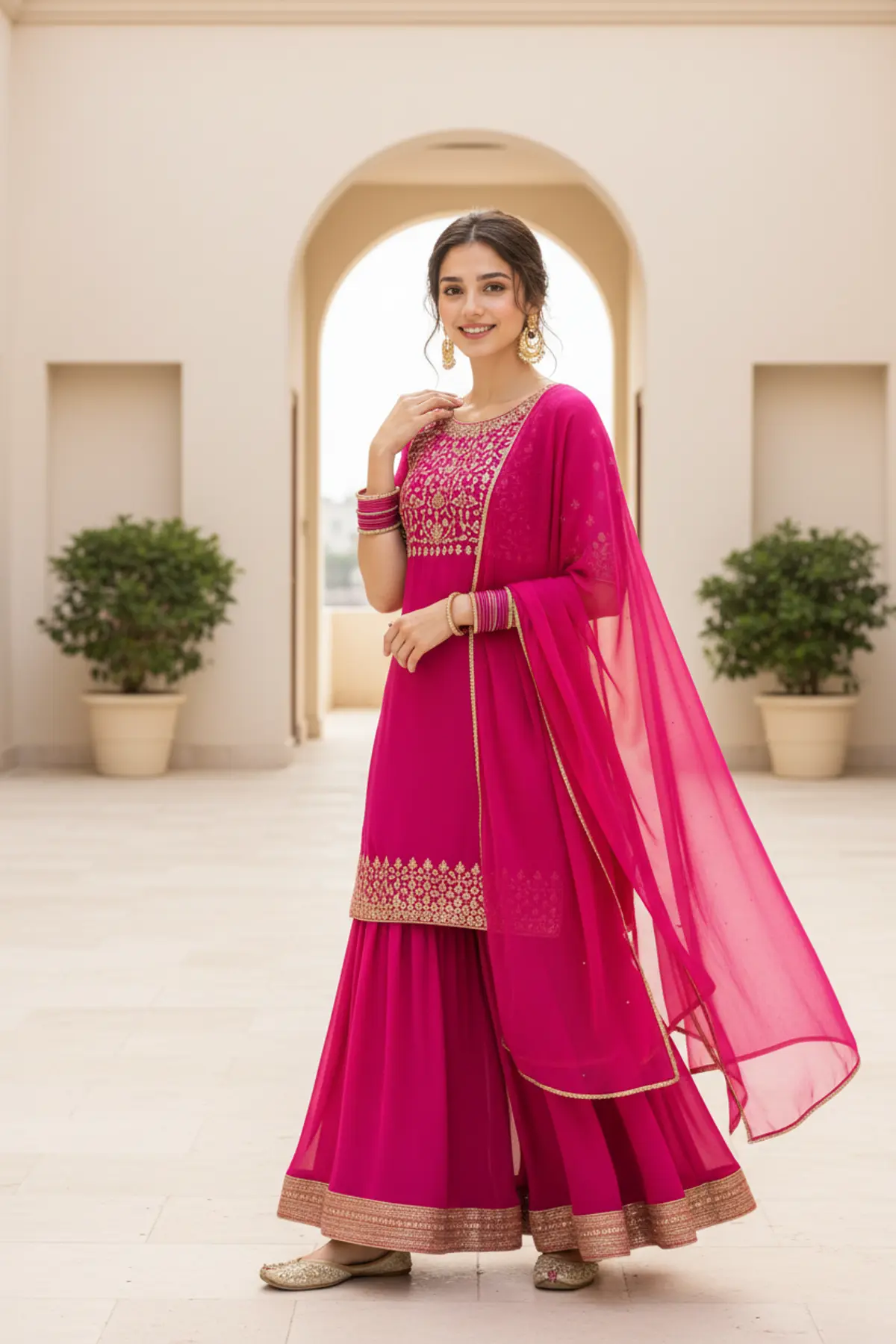
Fuchsia Festive Grace — Vibrant Indian Fashion Portrait
A vibrant Indian fashion editorial preserving the subject’s exact identity while showcasing a flowing fuchsia sharara, intricate gold detailing, elegant jewelry, and a bright architectural setting with natural festive energy.
Copy this, then paste it with your photo in Gemini or ChatGPT
ChatGPT opens with your prompt filled in. In Gemini, paste it. Add your photo there and send.ChatGPT opens with your prompt filled in. In Gemini, long-press the box, tap Paste. Add your photo.
Prompt
Needs 1 photo
Turn the uploaded photo into a bright, candid fashion photo of the same woman in a fuchsia sharara set, styled like an outdoor festive editorial shoot. Her face: she must be clearly the same woman as in the photo. Keep her face shape, features and proportions, her natural asymmetry, her age and her true skin tone exactly as they are, along with her own hair colour and build. No beautifying, smoothing, reshaping or swapping of the face. Setting: a clean, symmetrical courtyard that opens onto daylight, with smooth cream stone underfoot, plain neutral walls and potted green plants set out in matching pairs. Keep it empty and tidy: no other people, no clutter, nothing distracting. Pose: she stands next to a smooth stone column, her body turned about three-quarters to the camera in a loose, easy way. One hand is lifted to her shoulder, settling the dupatta; the other arm hangs naturally. Her face turns fully to the lens, eyes on the viewer, with a warm, spontaneous smile. Outfit: a vivid fuchsia georgette sharara set. The trousers flare out wide from the hip with lots of fabric and are edged at the ankle with a gold gota patti border. The kurti is short, ending just past the hip, round-necked, with fine gold embroidery across the bodice. A sheer fuchsia organza dupatta with a thin gold edge rests loosely on her right shoulder, its end falling away behind her. Gold embellished khussas on her feet. Hair and jewellery: hair half up in a soft, loose bun, with curls around her face and a few stray strands. Large gold chandbali earrings finished with teardrop drops, and stacks of fuchsia and gold glass bangles on both wrists. Light: soft daylight from a lightly overcast sky, spread evenly over the whole outfit, with only gentle shadows and a cheerful festive brightness. The fuchsia fabric glows warmly; the gold work picks up small, even highlights. Camera: chest height, 35mm lens at around f/2.8, framed from the knees up so the column, walls and plants are clearly part of the picture. A little handheld looseness, like a real lifestyle shoot. Colour and detail: fuchsia, warm gold, cream and soft plant green, with the background kept slightly muted so the outfit leads. Show the flowing georgette and its volume, the raised gota work, the see-through edge of the organza and the embroidery on the bodice. Real skin with visible texture. Avoid: any change to her face or skin tone; plastic, waxy or over-smoothed skin; beauty filters or fake symmetry; a CGI, 3D, cartoon, anime or illustrated look; warped hands or wrong finger counts; odd limbs or proportions; oversaturation, heavy HDR, blown highlights or unnatural blur; repeated objects; any text, logo or watermark. Format: vertical, 3:4.
How to use this prompt
In Gemini
- Tap Copy prompt, or Open in Gemini, which copies it for you.
- In Gemini, add your photo with the + button.
- Paste the prompt into the message box and send.
In ChatGPT
- Tap Open in ChatGPT: it opens with the prompt filled in (it is copied too, in case you need to paste it).
- Attach your photo with the + button.
- Send, and wait for your picture.
Gemini se kaise banaye: photo upload karo, prompt paste karo, send dabao.
Questions people ask
Is this prompt free?
Yes. Copy it and use it in Gemini, ChatGPT or another AI photo app as often as you like. You don't need a pixkoz account to copy it.
Will it work on my photo?
It works best with a clear, front-facing photo in good light, with the face fully visible. AI results vary from one try to the next: if a detail is off, try again.
Gemini or ChatGPT: which is better for this?
Both can use it. The examples on this page were made with Google: Nano Banana (Gemini 2.5 Flash Image), the model behind Gemini's images, so Gemini comes closest to them; ChatGPT gives its own take on the same prompt.
What happens to my photo?
When you use the prompt in Gemini or ChatGPT, your photo goes to that app, not to pixkoz, and that app's own privacy terms apply.