Open this in the pixkoz appGet the pixkoz app on Google PlayUse the pixkoz app
OpenGetOpen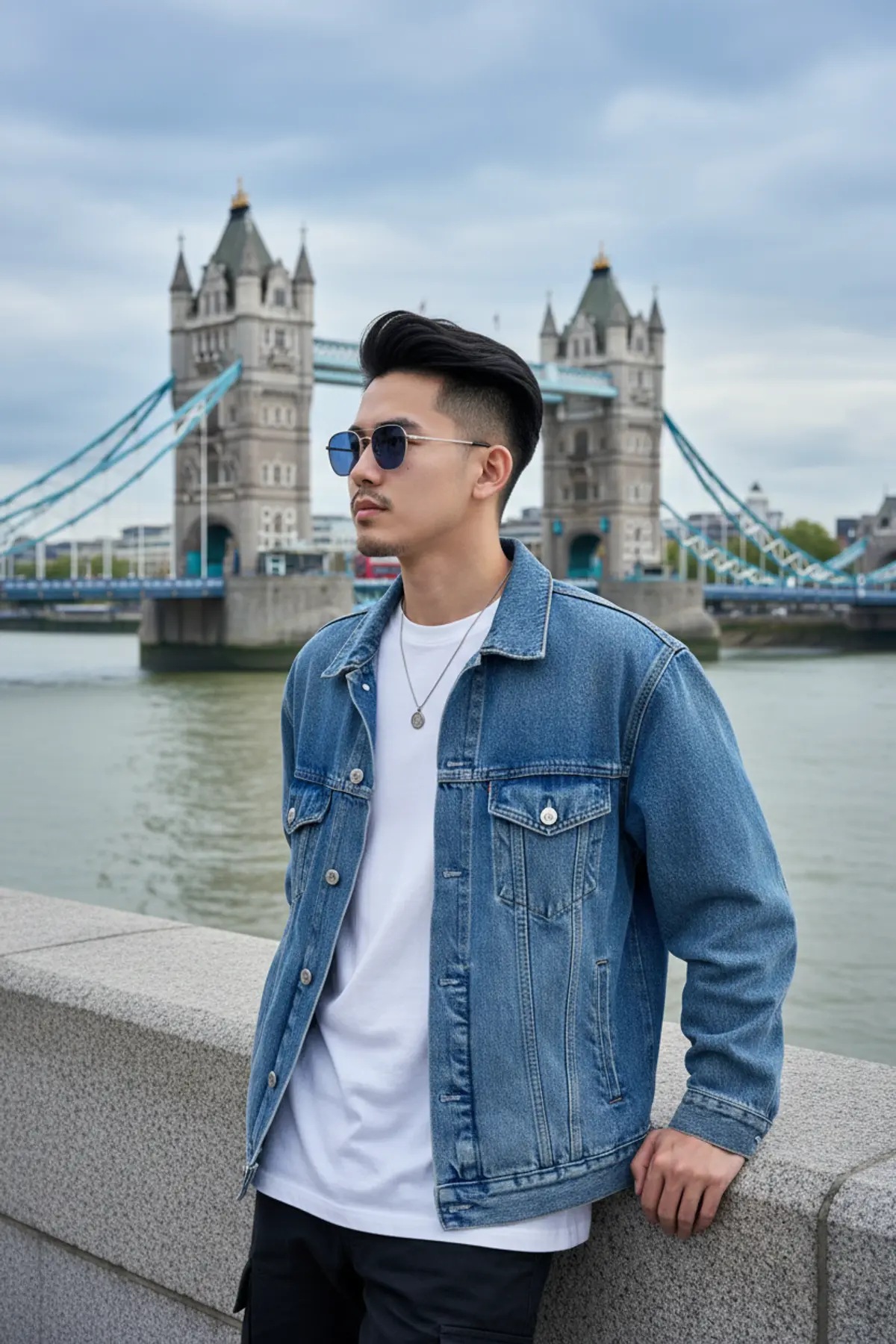
London Riverside Gentleman — Denim Travel Editorial
A photorealistic travel lifestyle portrait preserving the subject’s recognizable identity while blending relaxed denim fashion, a grand Victorian bridge, moody riverside scenery, and cinematic overcast daylight.
Copy this, then paste it with your photo in Gemini or ChatGPT
ChatGPT opens with your prompt filled in. In Gemini, paste it. Add your photo there and send.ChatGPT opens with your prompt filled in. In Gemini, long-press the box, tap Paste. Add your photo.
Prompt
Needs 1 photo
Use the uploaded reference photo as the identity reference. Preserve the person's recognizable facial identity, facial structure, hairstyle and natural skin texture accurately. "A stylish travel lifestyle portrait of a young man(uploaded reference photo) with short, thick black hair styled in a voluminous swept-up quiff with faded sides, light stubble, and a trimmed mustache, gazing off to the side with a cool, calm, composed expression. He wears slim metal-framed sunglasses with dark blue-tinted lenses, a small stud earring, and a thin dark chain necklace with a small pendant. He wears an oversized washed-denim trucker jacket in faded indigo blue with pale snap buttons and chest pockets, layered open over a plain white t-shirt. He stands leaning casually against a grey granite riverside wall, one hand resting on the ledge. Behind him is a grand Gothic Victorian-style bascule bridge with two stone towers topped with pointed spires, and sky-blue steel suspension walkways, spanning a wide river with calm, murky green-grey water. A red double-decker bus is faintly visible on the bridge, and low-rise buildings and green trees line the far bank. The sky is overcast with soft blue-grey clouds. Soft, diffused natural daylight, a cool palette of denim blue, teal, stone grey, and white, natural skin texture, shallow depth of field, travel lifestyle photography, low camera angle, shot on a smartphone, vertical 4:5 aspect ratio, three-quarter body framing, sharp focus on the subject." Tips: Add "photorealistic, London riverside, moody overcast sky, cinematic color grading" for a more polished look. For a warmer mood, add "golden hour glow, soft sun breaking through clouds." To keep the location generic, replace the bridge with "a grand Gothic-style twin-tower bascule bridge."
How to use this prompt
In Gemini
- Tap Copy prompt, or Open in Gemini, which copies it for you.
- In Gemini, add your photo with the + button.
- Paste the prompt into the message box and send.
In ChatGPT
- Tap Open in ChatGPT: it opens with the prompt filled in (it is copied too, in case you need to paste it).
- Attach your photo with the + button.
- Send, and wait for your picture.
Gemini se kaise banaye: photo upload karo, prompt paste karo, send dabao.
Questions people ask
Is this prompt free?
Yes. Copy it and use it in Gemini, ChatGPT or another AI photo app as often as you like. You don't need a pixkoz account to copy it.
Will it work on my photo?
It works best with a clear, front-facing photo in good light, with the face fully visible. AI results vary from one try to the next: if a detail is off, try again.
Gemini or ChatGPT: which is better for this?
Both can use it. The examples on this page were made with Google: Nano Banana (Gemini 2.5 Flash Image), the model behind Gemini's images, so Gemini comes closest to them; ChatGPT gives its own take on the same prompt.
What happens to my photo?
When you use the prompt in Gemini or ChatGPT, your photo goes to that app, not to pixkoz, and that app's own privacy terms apply.