Open this in the pixkoz appGet the pixkoz app on Google PlayUse the pixkoz app
OpenGetOpen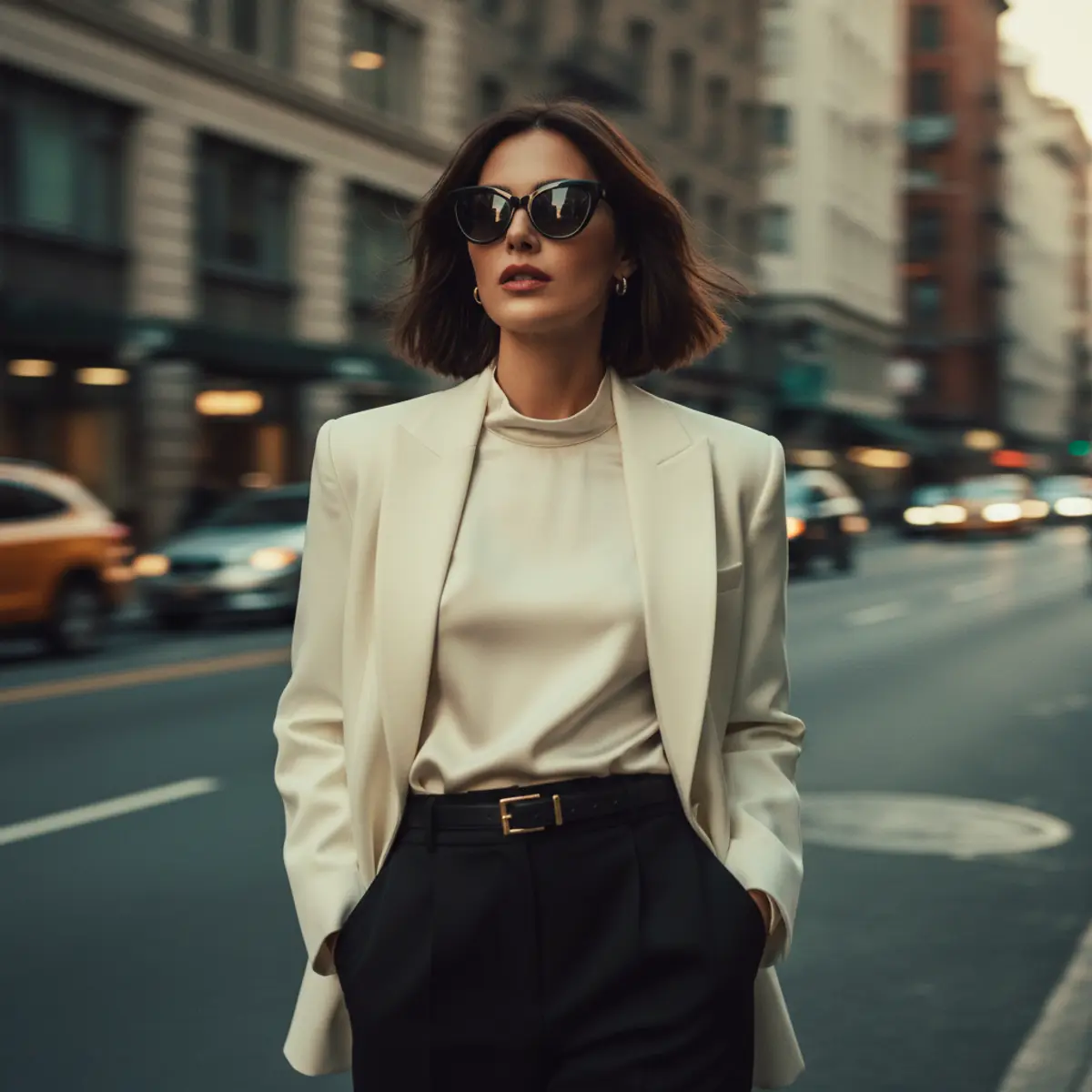
Cinematic Motion Blur — Urban Luxury
A high-end fashion editorial portrait blending sophisticated ivory tailoring, bold black accents, cinematic city motion blur, and a sharply defined subject for a dynamic luxury street-photography aesthetic.
Copy this, then paste it with your photo in Gemini or ChatGPT
ChatGPT opens with your prompt filled in. In Gemini, paste it. Add your photo there and send.ChatGPT opens with your prompt filled in. In Gemini, long-press the box, tap Paste. Add your photo.
Prompt
Needs 1 photo
{ "image_short_title": "🖤 Cinematic Motion Blur Fashion Portrait", "photo_design": { "style": "cinematic luxury fashion street photography", "format": "vertical editorial portrait", "aspect_ratio": "4:5", "camera": { "type": "professional digital camera", "lens": "50mm portrait lens", "angle": "eye-level", "framing": "three-quarter to full-body portrait", "focus": "subject sharply defined against heavily motion-blurred surroundings", "shutter": "slow shutter / intentional motion blur", "look": "premium fashion editorial photography" }, "subject": { "pose": "standing or walking confidently toward the camera", "body_position": "upright with relaxed shoulders", "gaze": "looking slightly toward the side", "expression": "calm, confident and sophisticated", "hair": "short-to-medium dark brown bob haircut, swept naturally by movement", "movement": "hair and clothing subtly affected by motion" }, "face": { "makeup": "minimal polished makeup", "lips": "soft muted red lipstick", "skin": "natural smooth skin texture with realistic highlights", "accessories": [ "large black cat-eye sunglasses", "small elegant earrings" ] }, "outfit": { "blazer": "structured ivory-white oversized blazer", "inner_top": "cream satin high-neck blouse", "bottom": "high-waisted black tailored trousers", "belt": "black belt with elegant gold buckle", "style": "minimal luxury, sophisticated and timeless" }, "background": { "location": "urban city street", "environment": "moving city traffic and architecture", "effect": "strong horizontal motion blur across the entire background", "motion_direction": "left-to-right horizontal streaks", "details": [ "blurred vehicles", "city lights", "building shapes", "street-level movement" ], "depth": "deep urban perspective" }, "lighting": { "type": "cinematic natural city light", "key_light": "soft directional light on the subject", "highlights": "warm golden highlights", "shadows": "soft but defined", "mood": "dramatic, elegant and cinematic" }, "color_grade": { "overall": "warm vintage cinematic color grade", "palette": [ "cream", "ivory", "black", "golden amber", "muted teal green" ], "contrast": "medium-high", "saturation": "rich but slightly muted", "film_look": "subtle vintage film character" }, "composition": { "subject_position": "center frame", "visual_focus": [ "face", "sunglasses", "white blazer", "hair movement" ], "foreground": "subtle motion streaks", "background": "strong horizontal motion trails", "balance": "sharp central subject contrasted against dynamic blurred surroundings" }, "photographic_finish": { "realism": "highly photorealistic", "skin_texture": "natural realistic texture", "fabric_texture": "visible blazer and satin texture", "motion_blur": "smooth professional long-exposure effect", "quality": "4K", "finish": "high-end fashion magazine editorial" }, "negative_prompt": [ "AI-looking face", "plastic skin", "excessive beauty retouching", "distorted body", "extra limbs", "warped sunglasses", "deformed hands", "overly artificial motion blur", "flat lighting", "oversaturation", "excessive HDR", "cartoon", "illustration", "3D render", "studio backdrop" ] } }
How to use this prompt
In Gemini
- Tap Copy prompt, or Open in Gemini, which copies it for you.
- In Gemini, add your photo with the + button.
- Paste the prompt into the message box and send.
In ChatGPT
- Tap Open in ChatGPT: it opens with the prompt filled in (it is copied too, in case you need to paste it).
- Attach your photo with the + button.
- Send, and wait for your picture.
Gemini se kaise banaye: photo upload karo, prompt paste karo, send dabao.
Questions people ask
Is this prompt free?
Yes. Copy it and use it in Gemini, ChatGPT or another AI photo app as often as you like. You don't need a pixkoz account to copy it.
Will it work on my photo?
It works best with a clear, front-facing photo in good light, with the face fully visible. AI results vary from one try to the next: if a detail is off, try again.
Gemini or ChatGPT: which is better for this?
Both can use it. The examples on this page were made with Google: Nano Banana (Gemini 2.5 Flash Image), the model behind Gemini's images, so Gemini comes closest to them; ChatGPT gives its own take on the same prompt.
What happens to my photo?
When you use the prompt in Gemini or ChatGPT, your photo goes to that app, not to pixkoz, and that app's own privacy terms apply.