Open this in the pixkoz appGet the pixkoz app on Google PlayUse the pixkoz app
OpenGetOpen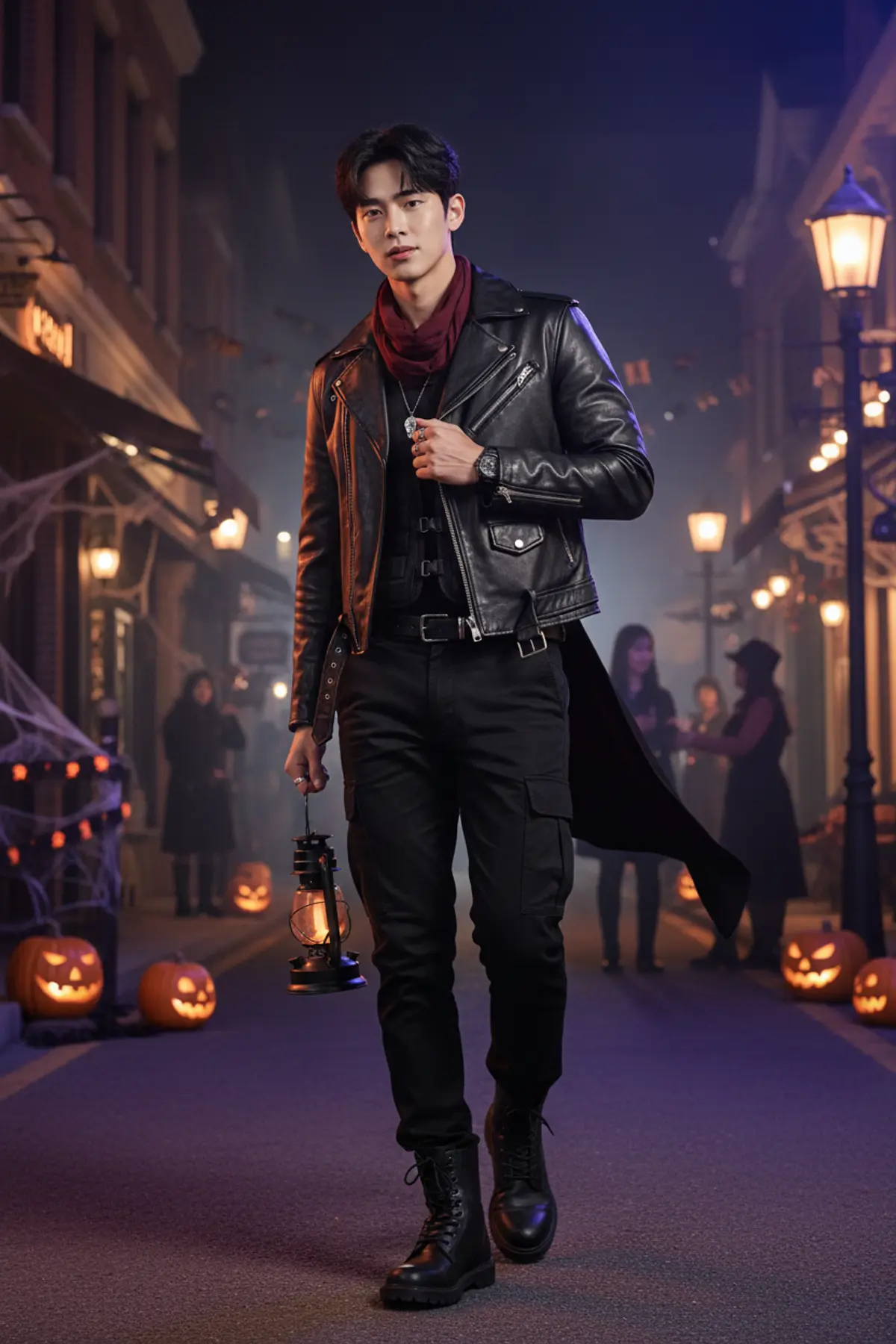
🎃 Halloween — Midnight Street Style 🖤
Own the Halloween night with a sleek all-black leather look, a glowing pumpkin lantern, and cinematic orange-and-purple street lights—a bold, realistic style statement. 🕸️✨
Copy this, then paste it with your photo in Gemini or ChatGPT
ChatGPT opens with your prompt filled in. In Gemini, paste it. Add your photo there and send.ChatGPT opens with your prompt filled in. In Gemini, long-press the box, tap Paste. Add your photo.
Prompt
Needs 1 photo
Strict Identity Lock Use the uploaded photo as the ONLY and STRICT identity reference for the man. Preserve his exact recognizable identity, facial geometry, forehead, eyebrows, eyes, nose, lips, cheeks, jawline, chin, skin tone, natural skin texture, hairline, hairstyle, facial hair if present, age appearance, and natural body proportions. His face must remain completely recognizable and realistic. The costume must be designed around his original appearance, never by changing his face. Cool Halloween Costume — Dark Phantom Transform his outfit into a premium, edgy Halloween streetwear costume inspired by a modern dark phantom character. Dress him in a fitted black leather biker jacket with subtle distressed textures, structured shoulders, matte-black metal zippers, and understated dark-silver hardware. Underneath, add a fitted charcoal-black shirt with a layered black tactical-style vest featuring tasteful straps and buckles. Pair it with slim black cargo trousers, a black leather belt with a brushed-metal buckle, and rugged black combat boots. Add a dark burgundy scarf loosely wrapped around the neck, a few silver rings, a black wristwatch, and a subtle chain accessory. Include a small, weathered silver pendant for a mysterious Halloween touch. Add a half-cape or short asymmetrical fabric panel attached to one shoulder, moving naturally in the night breeze. The costume should look like a stylish, realistic Halloween character outfit from a high-end fashion editorial—not ordinary everyday clothing, not a cheap party costume, and not exaggerated fantasy armor. Keep the entire face uncovered. No mask, no face paint, no fake scars, and no prosthetics. Pose and Action — Mid-Video Freeze-Frame Capture the man in a confident walking pose on a lively Halloween street at night, turning his head slightly toward the camera as if someone has just called his name. His shoulders are relaxed but confident. One hand lightly grips the lapel of his leather jacket while the other holds a black metal lantern containing a warm orange glow. The short cape and scarf move subtly in the breeze. Give him a cool, composed expression with a slight confident smirk and direct eye contact. His pose should feel spontaneous, powerful, and natural, like a perfectly captured frame from a stylish Halloween fashion video. Halloween Environment Place him on a realistic urban street transformed for Halloween. Include carved pumpkins glowing along the pavement, black-and-orange decorations, vintage streetlamps, subtle cobwebs around shop entrances, distant silhouettes of people in creative Halloween costumes, and moody shop windows glowing amber and violet. Add a faint layer of atmospheric street haze near the background only. Keep the street believable, detailed, and lively without distracting from the man. Cinematic Lighting and Photography Vertical 9:16 composition, mid-thigh-up framing, eye-level camera angle, slightly dynamic three-quarter body position. Use cinematic orange rim lighting from one side and cool violet-blue street lighting from the other, with realistic shadows and reflections on the leather jacket. Keep his face naturally exposed, sharply focused, and accurately colored. Photorealistic DSLR street-fashion photography, 50mm lens aesthetic, shallow depth of field, realistic skin pores, detailed leather grain, visible fabric stitching, natural hair strands, accurate hands, lifelike proportions, subtle background motion blur, premium editorial color grading, high detail, 4K-quality appearance. The image should resemble a genuine paused frame from a professionally filmed Halloween streetwear video—not a digital painting or movie poster. Absolute Identity and Quality Restrictions Change only the outfit, pose, accessories, lighting, and environment. Preserve the original man's facial identity, skin tone, hairstyle, facial hair, age appearance, and body build. No face replacement, no identity blending, no facial reshaping, no beauty filter, no skin smoothing, no glowing eyes, no supernatural facial changes, no altered ethnicity, no exaggerated muscles, no distorted hands, no extra fingers, no extra limbs, no duplicated subject, no plastic skin, no excessive fog, no cartoon, no CGI appearance, no text, and no watermark.
How to use this prompt
In Gemini
- Tap Copy prompt, or Open in Gemini, which copies it for you.
- In Gemini, add your photo with the + button.
- Paste the prompt into the message box and send.
In ChatGPT
- Tap Open in ChatGPT: it opens with the prompt filled in (it is copied too, in case you need to paste it).
- Attach your photo with the + button.
- Send, and wait for your picture.
Gemini se kaise banaye: photo upload karo, prompt paste karo, send dabao.
Questions people ask
Is this prompt free?
Yes. Copy it and use it in Gemini, ChatGPT or another AI photo app as often as you like. You don't need a pixkoz account to copy it.
Will it work on my photo?
It works best with a clear, front-facing photo in good light, with the face fully visible. AI results vary from one try to the next: if a detail is off, try again.
Gemini or ChatGPT: which is better for this?
Both can use it. The examples on this page were made with Google: Nano Banana (Gemini 2.5 Flash Image), the model behind Gemini's images, so Gemini comes closest to them; ChatGPT gives its own take on the same prompt.
What happens to my photo?
When you use the prompt in Gemini or ChatGPT, your photo goes to that app, not to pixkoz, and that app's own privacy terms apply.