Open this in the pixkoz appGet the pixkoz app on Google PlayUse the pixkoz app
OpenGetOpen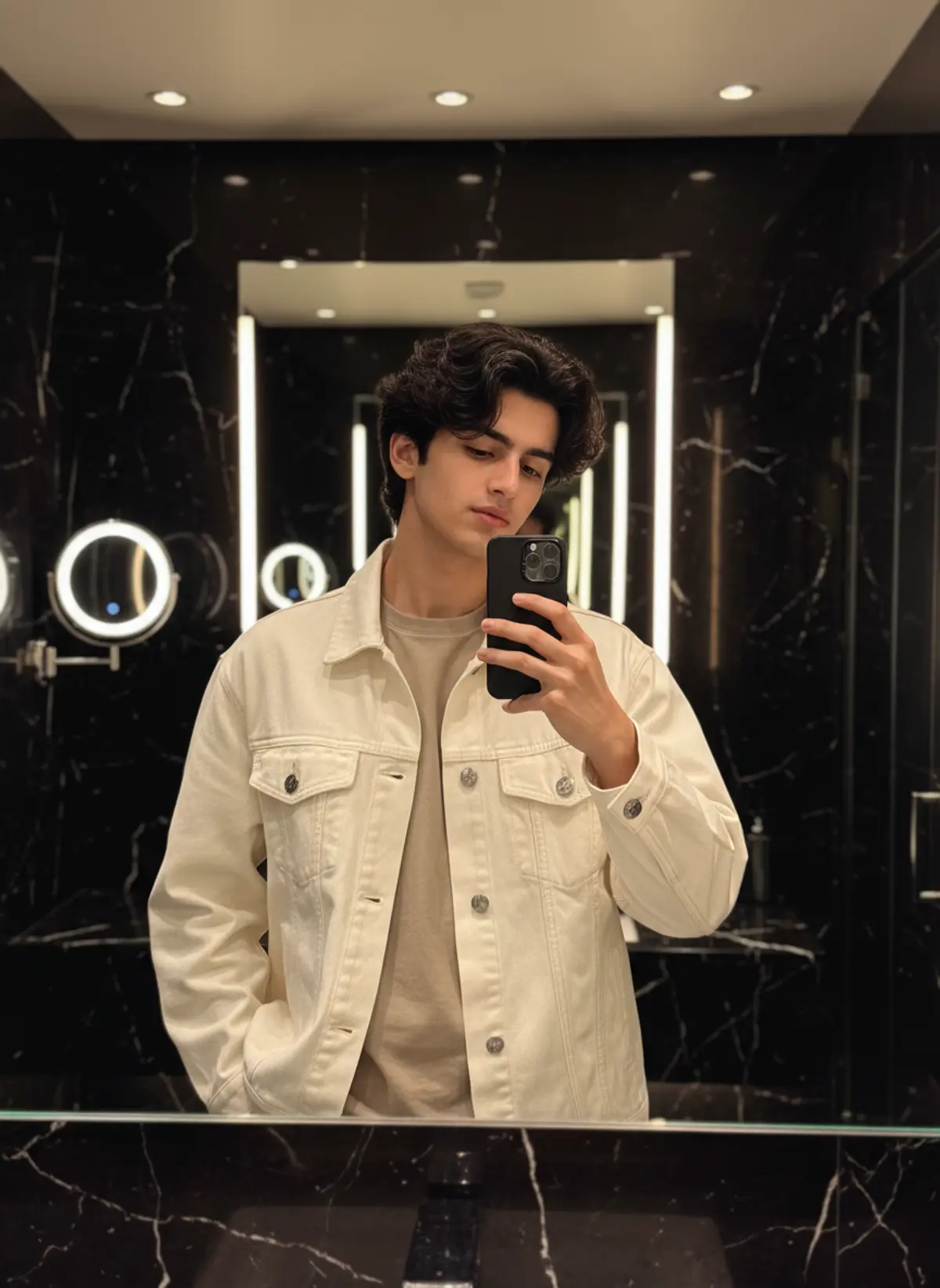

Luxury Marble Mirror Selfie
A sophisticated men’s fashion portrait featuring a cream oversized denim jacket, textured messy waves, and warm cinematic lighting inside a luxurious dark marble bathroom.
Copy this, then paste it with your photo in Gemini or ChatGPT
ChatGPT opens with your prompt filled in. In Gemini, paste it. Add your photo there and send.ChatGPT opens with your prompt filled in. In Gemini, long-press the box, tap Paste. Add your photo.
Prompt
Needs 1 photo
{ "image_design": { "type": "luxury_bathroom_mirror_selfie", "aspect_ratio": "4:5", "style": "photorealistic, cinematic, premium fashion editorial", "subject": { "gender": "male", "age_appearance": "young adult", "pose": "standing in front of a large bathroom mirror", "expression": "calm, serious and relaxed", "gaze": "looking slightly downward toward the phone", "right_hand": "holding smartphone in front of face", "left_hand": "resting casually near trouser pocket", "framing": "upper body to waist" }, "hair": { "color": "dark brown/black", "style": "thick voluminous messy wavy hair", "length": "medium", "texture": "natural curls and loose waves", "front": "soft textured strands falling toward forehead", "finish": "slightly glossy natural texture" }, "outfit": { "jacket": { "type": "oversized denim trucker jacket", "color": "off-white / cream", "material": "cotton denim", "fit": "relaxed oversized", "details": "two chest flap pockets, visible stitching, metal buttons" }, "inner_shirt": { "type": "plain crew-neck t-shirt", "color": "beige / light taupe", "fit": "regular relaxed fit" } }, "smartphone": { "type": "modern premium smartphone", "color": "matte black", "case": "dark black case", "camera": "triple-lens camera module", "orientation": "vertical", "position": "held in right hand in front of mirror" }, "environment": { "location": "luxury modern bathroom", "walls": "black polished marble", "mirror": "large frameless rectangular mirror", "counter": "dark black marble vanity", "lighting": "warm recessed ceiling lights", "left_side": "round illuminated vanity mirror/light visible in reflection", "background": "dark glossy marble with subtle white veining", "decor": "minimal premium hotel-style bathroom", "overall_mood": "luxurious, dark, warm and sophisticated" }, "lighting": { "type": "warm indoor luxury lighting", "key_light": "soft warm ceiling downlights", "highlights": "subtle highlights on hair and jacket", "shadows": "soft natural shadows", "skin_lighting": "warm and realistic", "contrast": "medium-high cinematic contrast" }, "composition": { "orientation": "vertical", "subject_position": "center", "mirror_reflection": "clear and realistic", "camera_angle": "eye-level mirror selfie", "foreground": "black marble vanity visible along bottom edge", "background": "symmetrical dark marble bathroom", "visual_focus": "face, textured hair, cream jacket and mirror reflection" }, "camera": { "style": "high-end smartphone photography", "lens_look": "approximately 35mm equivalent", "focus": "sharp face and clothing details", "depth_of_field": "moderate", "image_quality": "high resolution", "realism": "natural photographic detail" }, "color_palette": { "dominant": [ "black", "cream", "off-white", "beige", "warm gold", "dark brown" ], "contrast": "high", "saturation": "slightly muted", "tone": "warm luxury cinematic" }, "overall_aesthetic": "luxury hotel bathroom mirror selfie, Korean-inspired mens fashion, cream denim jacket, messy wavy hair, dark marble interior, warm cinematic lighting", "negative_prompt": [ "cartoon", "anime", "illustration", "plastic skin", "over-smoothed face", "distorted hands", "extra fingers", "duplicate phone", "warped mirror reflection", "incorrect clothing", "bright colorful bathroom", "low resolution", "blurred face", "overexposure", "text", "watermark", "logo" ] },
How to use this prompt
In Gemini
- Tap Copy prompt, or Open in Gemini, which copies it for you.
- In Gemini, add your photo with the + button.
- Paste the prompt into the message box and send.
In ChatGPT
- Tap Open in ChatGPT: it opens with the prompt filled in (it is copied too, in case you need to paste it).
- Attach your photo with the + button.
- Send, and wait for your picture.
Gemini se kaise banaye: photo upload karo, prompt paste karo, send dabao.
Questions people ask
Is this prompt free?
Yes. Copy it and use it in Gemini, ChatGPT or another AI photo app as often as you like. You don't need a pixkoz account to copy it.
Will it work on my photo?
It works best with a clear, front-facing photo in good light, with the face fully visible. AI results vary from one try to the next: if a detail is off, try again.
Gemini or ChatGPT: which is better for this?
Both can use it. The examples on this page were made with Google: Nano Banana (Gemini 2.5 Flash Image), the model behind Gemini's images, so Gemini comes closest to them; ChatGPT gives its own take on the same prompt.
What happens to my photo?
When you use the prompt in Gemini or ChatGPT, your photo goes to that app, not to pixkoz, and that app's own privacy terms apply.