Open this in the pixkoz appGet the pixkoz app on Google PlayUse the pixkoz app
OpenGetOpen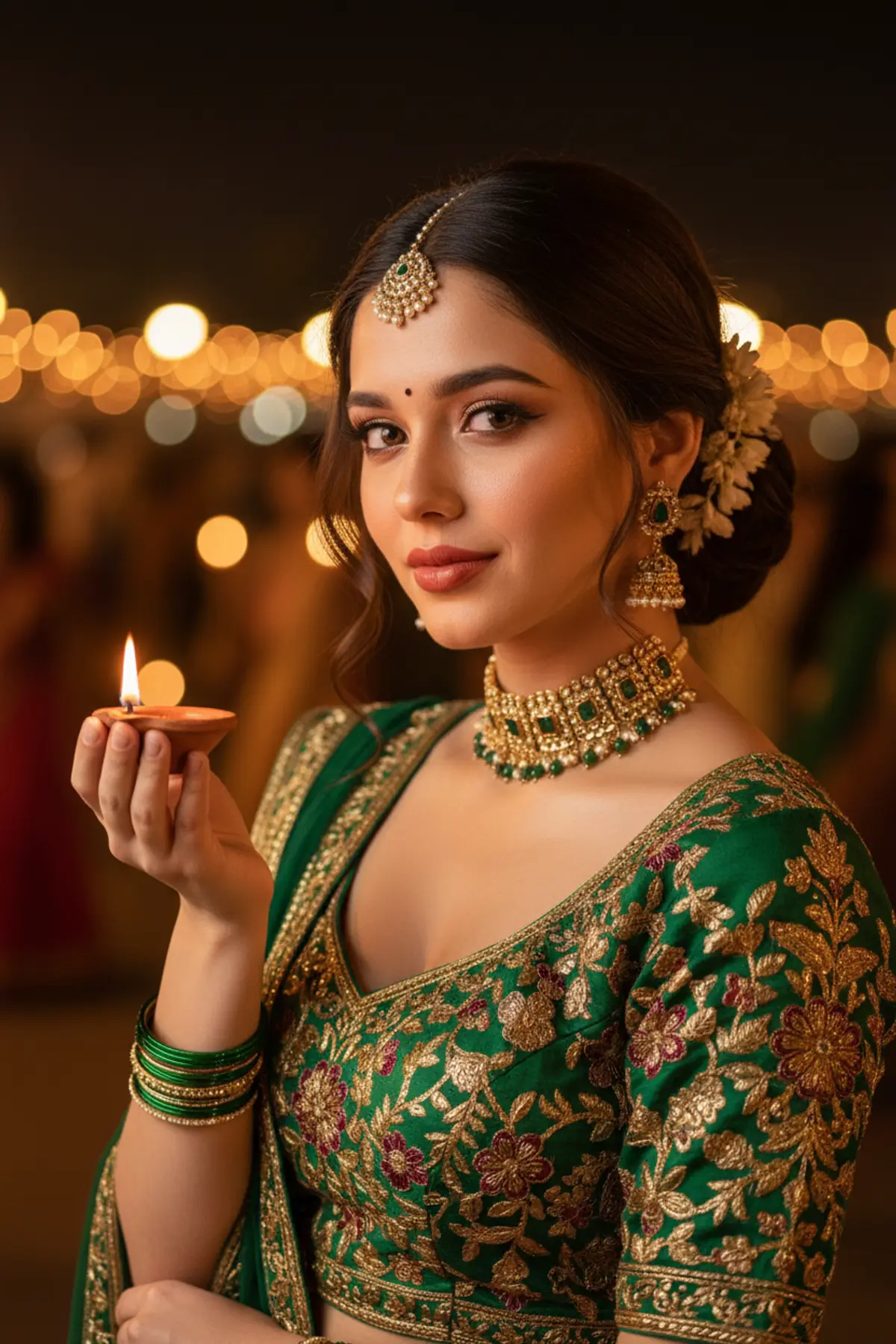
Diya Glow – A Mesmerizing Navratri Night Portrait 🪔✨
Capture the enchanting spirit of Navratri with an ultra-realistic, identity-preserved portrait featuring a forest-green and antique-gold Chaniya Choli, exquisite traditional jewelry, and a glowing clay diya illuminating her face against the dreamy golden bokeh of Ahmedabad’s vibrant Garba night.
Copy this, then paste it with your photo in Gemini or ChatGPT
ChatGPT opens with your prompt filled in. In Gemini, paste it. Add your photo there and send.ChatGPT opens with your prompt filled in. In Gemini, long-press the box, tap Paste. Add your photo.
Prompt
Needs 1 photo
Make a vertical 9:16 close-up portrait of the woman in the uploaded photo on a Navratri night, lit almost only by the clay diya she holds near her face. Cinematic, intimate, fully realistic. Her face: take it from the photo with no changes at all. The same eyes, eyelids and brows; the same nose, lips and jaw; the same proportions and natural skin tone; her own hair colour. No beauty filter and no smoothing: keep pores and real skin texture so she is instantly recognisable even this close. Pose: framed from the waist up, she turns softly three-quarters toward the camera, chin dipped a little, eyes lifted straight into the lens with a deep, expressive look and a small, private smile at the corners of her mouth. In her raised right hand, close to her chin, she holds one lit clay diya; the steady flame throws warm, directional light across her face, picking out her cheekbones, the bridge of her nose and the gold of her jewellery. Outfit: a chaniya choli blouse in forest green and antique gold, with a deep sweetheart neckline and dense hand-embroidered florals in gold and maroon thread, made of heavy raw silk whose texture catches the light. Hair: a sleek, centre-parted low bun finished with a few white jasmine flowers, two soft curls left free at the sides of her face, and a maang tikka of pearls and gold. Jewellery: a wide antique-gold choker set with green stones; teardrop jhumkas in emerald and gold tones; on both wrists, fine gold bangles mixed with green glass ones; and a small red bindi exactly between her brows. Makeup: rich and festive: smoky eyes in warm brown with a touch of gold shimmer at the inner corners, defined brows, a rose-gold highlight on the cheekbones and a glossy terracotta-red lip. Background: an Ahmedabad Garba ground on a warm, breezy night, completely out of focus: diya flames and the shapes of spinning dancers turned into warm bokeh in amber, gold and deep orange, with marigold decorations and rangoli at the edge of the ground dissolving into soft light. Light: the diya is nearly the only source, giving a dramatic chiaroscuro: half her face in warm amber light, half in soft shadow, with a faint fill from distant string lights so the shadow side never goes fully black. Artistic, magazine-quality. Camera: Canon EOS R5 look, 100mm macro-portrait lens at f/2, extremely shallow depth of field, so the background becomes pure soft light; her eyes and the diya flame pin-sharp, with fine skin texture visible. A light warm grade with slightly lifted highlights on skin and gold. Avoid: extra limbs or distorted anatomy; a soft or blurred face; plastic-looking or unnatural skin; low-resolution textures; cartoon or graphic styles; any text, logo or watermark. Format: vertical, 9:16.
How to use this prompt
In Gemini
- Tap Copy prompt, or Open in Gemini, which copies it for you.
- In Gemini, add your photo with the + button.
- Paste the prompt into the message box and send.
In ChatGPT
- Tap Open in ChatGPT: it opens with the prompt filled in (it is copied too, in case you need to paste it).
- Attach your photo with the + button.
- Send, and wait for your picture.
Gemini se kaise banaye: photo upload karo, prompt paste karo, send dabao.
Questions people ask
Is this prompt free?
Yes. Copy it and use it in Gemini, ChatGPT or another AI photo app as often as you like. You don't need a pixkoz account to copy it.
Will it work on my photo?
It works best with a clear, front-facing photo in good light, with the face fully visible. AI results vary from one try to the next: if a detail is off, try again.
Gemini or ChatGPT: which is better for this?
Both can use it. The examples on this page were made with Google: Nano Banana (Gemini 2.5 Flash Image), the model behind Gemini's images, so Gemini comes closest to them; ChatGPT gives its own take on the same prompt.
What happens to my photo?
When you use the prompt in Gemini or ChatGPT, your photo goes to that app, not to pixkoz, and that app's own privacy terms apply.





