Open this in the pixkoz appGet the pixkoz app on Google PlayUse the pixkoz app
OpenGetOpen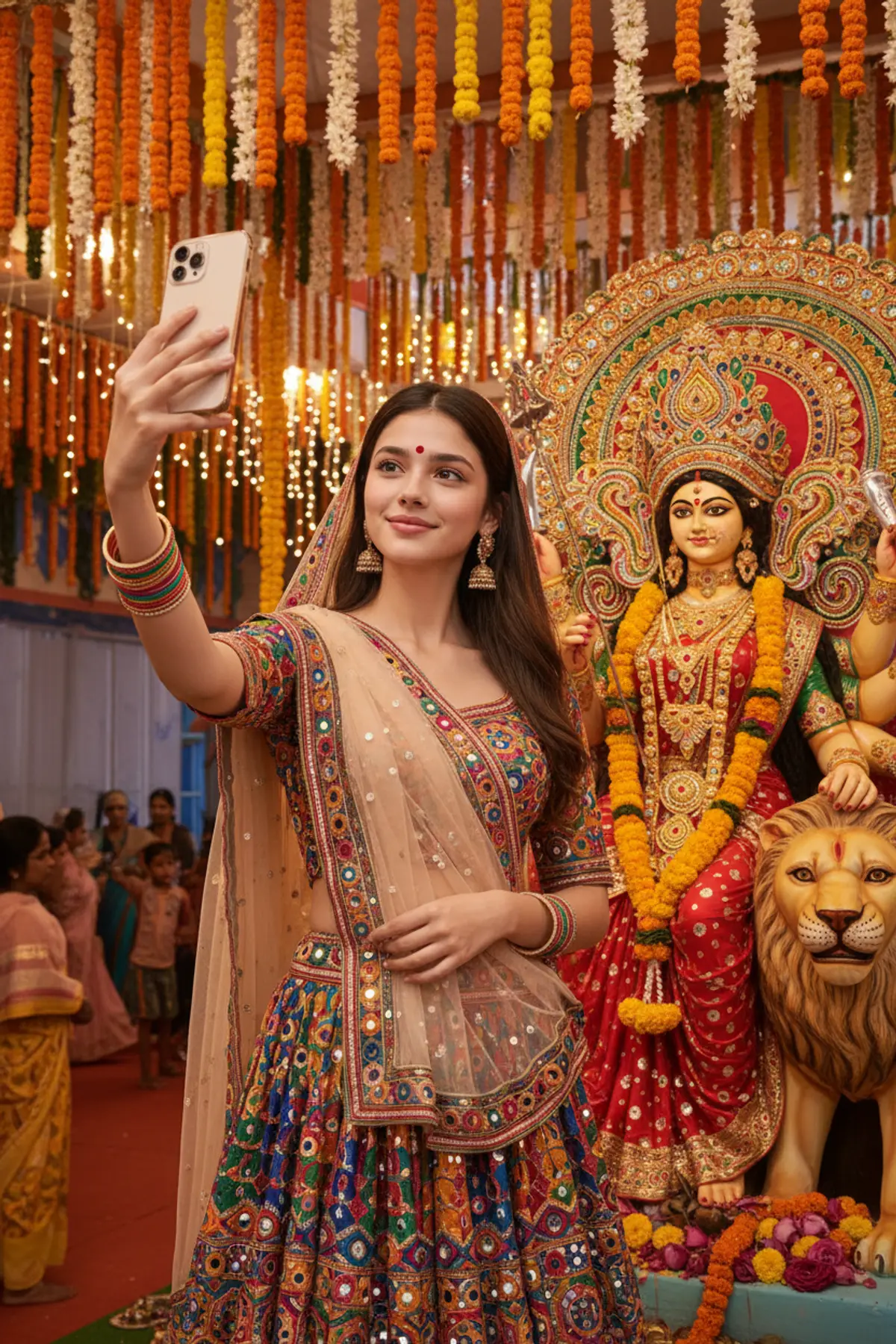
Navratri Selfie with Maa Durga 🙏🌺
Capture the festive spirit of Navratri with a beautiful traditional selfie beside Maa Durga, surrounded by glowing diyas, vibrant flowers, colorful Gujarati attire, and divine blessings.
Copy this, then paste it with your photo in Gemini or ChatGPT
ChatGPT opens with your prompt filled in. In Gemini, paste it. Add your photo there and send.ChatGPT opens with your prompt filled in. In Gemini, long-press the box, tap Paste. Add your photo.
Prompt
Needs 1 photo
AI Image Prompt — Navratri Selfie with Maa Durga 🙏 STRICT IDENTITY PRESERVATION: Use the uploaded photo as the ONLY and STRICT identity reference for the girl. Preserve her exact recognizable facial identity, face shape, forehead, eyebrows, eyes, nose, lips, cheeks, jawline, chin, skin tone, natural facial asymmetry, and age appearance. Keep her original hair color and recognizable hairstyle. Do not change, replace, reconstruct, beautify, reshape, or smooth her face. She must look like the same person in the uploaded photograph. Create an ultra-realistic, natural smartphone selfie portrait of the same girl standing beside a beautifully decorated Maa Durga statue during a Navratri celebration. Pose and selfie angle: The girl holds a smartphone at arm's length and takes a casual selfie with the camera. Her face is close to the lens, with a natural, gentle smile and her eyes looking directly into the phone camera. The framing includes her head, shoulders, upper body, and the Goddess Durga statue clearly beside her. Make the composition feel like a real personal selfie taken at a festive temple or Navratri pandal. Outfit and appearance: Keep the girl's original facial identity and natural body proportions. Dress her in a beautiful traditional Gujarati chaniya choli with colorful mirror work, embroidered details, and a matching dupatta. Add traditional jhumka earrings, bangles, and a small red bindi if appropriate. Keep makeup natural and realistic. Goddess statue: Place a grand, beautifully adorned Maa Durga idol beside her, wearing a vibrant red-and-gold outfit, an ornate golden crown, traditional jewelry, and flower garlands. Include her multiple arms and traditional divine attributes, with a lion nearby. The statue should look like an authentic, carefully decorated festival idol. Background: A festive Navratri temple or pandal decorated with marigold garlands, colorful flowers, warm string lights, glowing diyas, and traditional ornaments. Include a softly blurred festive crowd in the background. Photography style: Realistic front-camera smartphone selfie, natural perspective, authentic facial proportions, warm ambient lighting, realistic skin texture, detailed clothing, accurate hands and fingers, natural colors, and a joyful devotional atmosphere. Keep both the girl's face and the Goddess statue clearly recognizable. Avoid excessive cinematic effects or artificial beauty filters. Negative prompt: Changed face, different identity, face swap, altered facial features, beautified face, skin whitening, artificial skin smoothing, distorted selfie perspective, extra fingers, malformed hands, duplicate face, deformed Goddess statue, missing arms, blurry subject, cartoon, CGI, watermark, text, logo. Format: Vertical 9:16, high-resolution photorealistic selfie portrait, suitable for Instagram Reels covers and WhatsApp Status.
How to use this prompt
In Gemini
- Tap Copy prompt, or Open in Gemini, which copies it for you.
- In Gemini, add your photo with the + button.
- Paste the prompt into the message box and send.
In ChatGPT
- Tap Open in ChatGPT: it opens with the prompt filled in (it is copied too, in case you need to paste it).
- Attach your photo with the + button.
- Send, and wait for your picture.
Gemini se kaise banaye: photo upload karo, prompt paste karo, send dabao.
Questions people ask
Is this prompt free?
Yes. Copy it and use it in Gemini, ChatGPT or another AI photo app as often as you like. You don't need a pixkoz account to copy it.
Will it work on my photo?
It works best with a clear, front-facing photo in good light, with the face fully visible. AI results vary from one try to the next: if a detail is off, try again.
Gemini or ChatGPT: which is better for this?
Both can use it. The examples on this page were made with Google: Nano Banana (Gemini 2.5 Flash Image), the model behind Gemini's images, so Gemini comes closest to them; ChatGPT gives its own take on the same prompt.
What happens to my photo?
When you use the prompt in Gemini or ChatGPT, your photo goes to that app, not to pixkoz, and that app's own privacy terms apply.