Open this in the pixkoz appGet the pixkoz app on Google PlayUse the pixkoz app
OpenGetOpen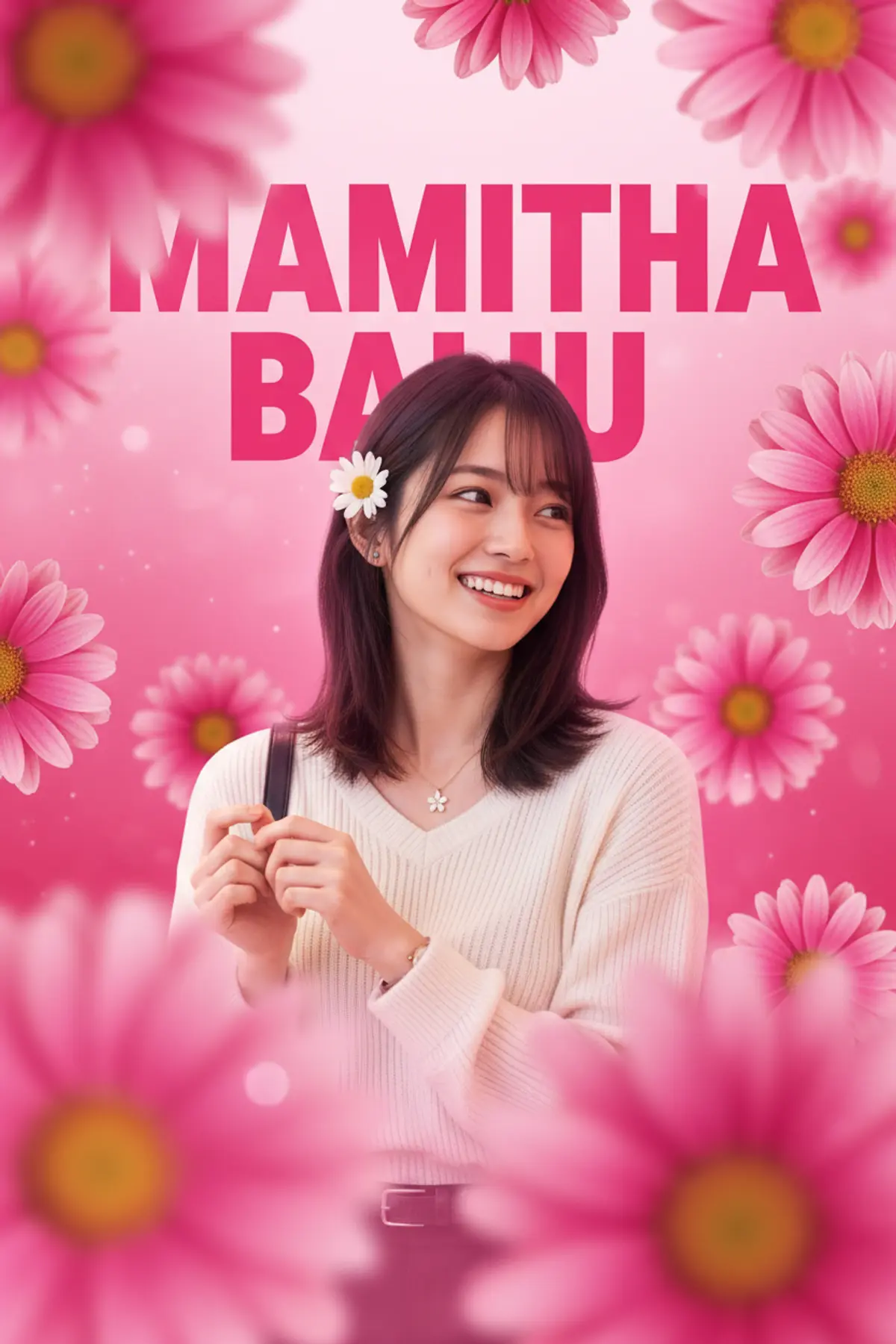

Vibrant Floral Poster Portrait
A joyful promotional portrait blending a radiant South Asian woman, bold pink typography, layered daisy blossoms, soft cinematic lighting, and a vibrant celebratory graphic aesthetic.
Copy this, then paste it with your photo in Gemini or ChatGPT
ChatGPT opens with your prompt filled in. In Gemini, paste it. Add your photo there and send.ChatGPT opens with your prompt filled in. In Gemini, long-press the box, tap Paste. Add your photo.
Prompt
Needs 1 photo
Create image 9:16, Use reference IMG{ "category": "graphic_design", "category_reasoning": "The image is a stylized composite featuring large typography and layered floral elements integrated with a central portrait.", "adaptable": "subject", "subject": "A young woman smiling broadly and looking off-camera to the right.", "subject_details": "South Asian female, apparent age 20-25, voluminous wavy dark hair, wearing a white textured saree or blouse, small black bindi, oxidized silver jhumka earrings, a single white daisy tucked behind her left ear.", "setting": "Stylized digital composite environment.", "setting_details": "Large bold pink typography reading 'MAMITHA BAIJU' in the background, surrounded by layered pink daisy-like flowers in both sharp focus and soft foreground blur.", "composition": "Medium close-up portrait, subject centered but looking off-axis, shallow depth of field with foreground floral elements acting as framing devices, text anchoring the background.", "camera": "Telephoto perspective, shallow depth of field, clear separation between foreground blur, subject, and background text.", "lighting": "Soft diffused frontal studio lighting, large specular catchlights at 10 o'clock, soft shadows, low lighting ratio.", "color_grade": "High-saturation pink monochromatic with warm skin tones.", "color_palette": "Pink, magenta, white, warm peach, dark brown.", "style": "Promotional poster, graphic composite, bright and cheerful aesthetic.", "mood": "Joyful, vibrant, celebratory, radiant.", "textures_materials": "Soft matte skin, crisp flower petals, smooth hair, textured woven cotton fabric of the white top.", "post_processing": "Heavy beauty retouching, frequency separation, digital compositing of text and foreground elements, added digital bloom/glow on the background.", "recreation_prompt": "Medium close-up portrait of a young South Asian woman smiling broadly looking off-camera, voluminous wavy dark hair, wearing a white textured saree, small black bindi, silver jhumka earrings, a single white daisy tucked behind her left ear, large bold pink typography reading 'MAMITHA BAIJU' in the background, layered pink daisy flowers in foreground and background, shallow depth of field, soft diffused studio lighting, high-saturation pink monochromatic color grade, vibrant, celebratory graphic design style, cinematic soft focus.", "adaptation_prompt": "Medium close-up portrait of [YOUR SUBJECT — describe yourself: appearance, outfit, pose], large bold pink typography reading 'MAMITHA BAIJU' in the background, layered pink daisy flowers in foreground and background, shallow depth of field, soft diffused studio lighting, high-saturation pink monochromatic color grade, vibrant, celebratory graphic design style, cinematic soft focus.", "negative_prompt": "dark, moody, desaturated, harsh shadows, sharp background, messy compositing, low resolution, bad typography.", "color_science": "High-key luminance, warm skin preservation, highly saturated pink highlights and midtones, lifted contrast.", "filter_name": "Digital Poster Composite", "filter_description": "Heavy localized skin smoothing, artificial depth of field via compositing, color-matched global pink tint, digital text layering.", "white_balance": "Warm daylight bias", "color_temperature": "Warm", "tone_curve": "S-curve with lifted shadows and compressed highlights", "dynamic_range": "Standard dynamic range, well-exposed midtones, bright highlights without clipping", "highlight_rendering": "Soft, blooming specular highlights on skin and jewelry", "shadow_rendering": "Luminous, low-density shadows with warm red/pink tint", "camera_rendering": "Digital sensor with high micro-contrast on focal point", "lens_rendering": "Simulated moderate telephoto, extremely smooth artificial bokeh on foreground elements", "noise_profile": "Clean digital, zero visible noise", "grain_profile": "No visible film grain", "sharpness_profile": "High digital sharpness on eyes, jewelry, and center petals, soft roll-off elsewhere", "retouching_analysis": "Intensive frequency separation, skin texture softened but pores slightly retained, eye whites brightened, teeth whitened", "portrait_analysis": "Head angled slightly to the right, direct eye contact avoided, high facial symmetry", "facial_expression": "Radiant, open-mouthed Duchenne smile showing teeth", "micro_expression": "Relaxed forehead, raised zygomatic major muscles, crinkled orbicularis oculi", "skin_rendering": "Even, glowing, highly retouched with soft specular highlights on nose and cheekbones", "hair_rendering": "Deep brown/black with soft ambient pink reflections, voluminous texture, individual flyaways visible", "lighting_analysis": "Broad softbox key light from front-left, extensive soft fill light, glowing pink ambient backlight", "visual_style_analysis": "Commercial promotional graphic, fan edit, bright celebrity portraiture" }
How to use this prompt
In Gemini
- Tap Copy prompt, or Open in Gemini, which copies it for you.
- In Gemini, add your photo with the + button.
- Paste the prompt into the message box and send.
In ChatGPT
- Tap Open in ChatGPT: it opens with the prompt filled in (it is copied too, in case you need to paste it).
- Attach your photo with the + button.
- Send, and wait for your picture.
Gemini se kaise banaye: photo upload karo, prompt paste karo, send dabao.
Questions people ask
Is this prompt free?
Yes. Copy it and use it in Gemini, ChatGPT or another AI photo app as often as you like. You don't need a pixkoz account to copy it.
Will it work on my photo?
It works best with a clear, front-facing photo in good light, with the face fully visible. AI results vary from one try to the next: if a detail is off, try again.
Gemini or ChatGPT: which is better for this?
Both can use it. The examples on this page were made with Google: Nano Banana (Gemini 2.5 Flash Image), the model behind Gemini's images, so Gemini comes closest to them; ChatGPT gives its own take on the same prompt.
What happens to my photo?
When you use the prompt in Gemini or ChatGPT, your photo goes to that app, not to pixkoz, and that app's own privacy terms apply.