Open this in the pixkoz appGet the pixkoz app on Google PlayUse the pixkoz app
OpenGetOpen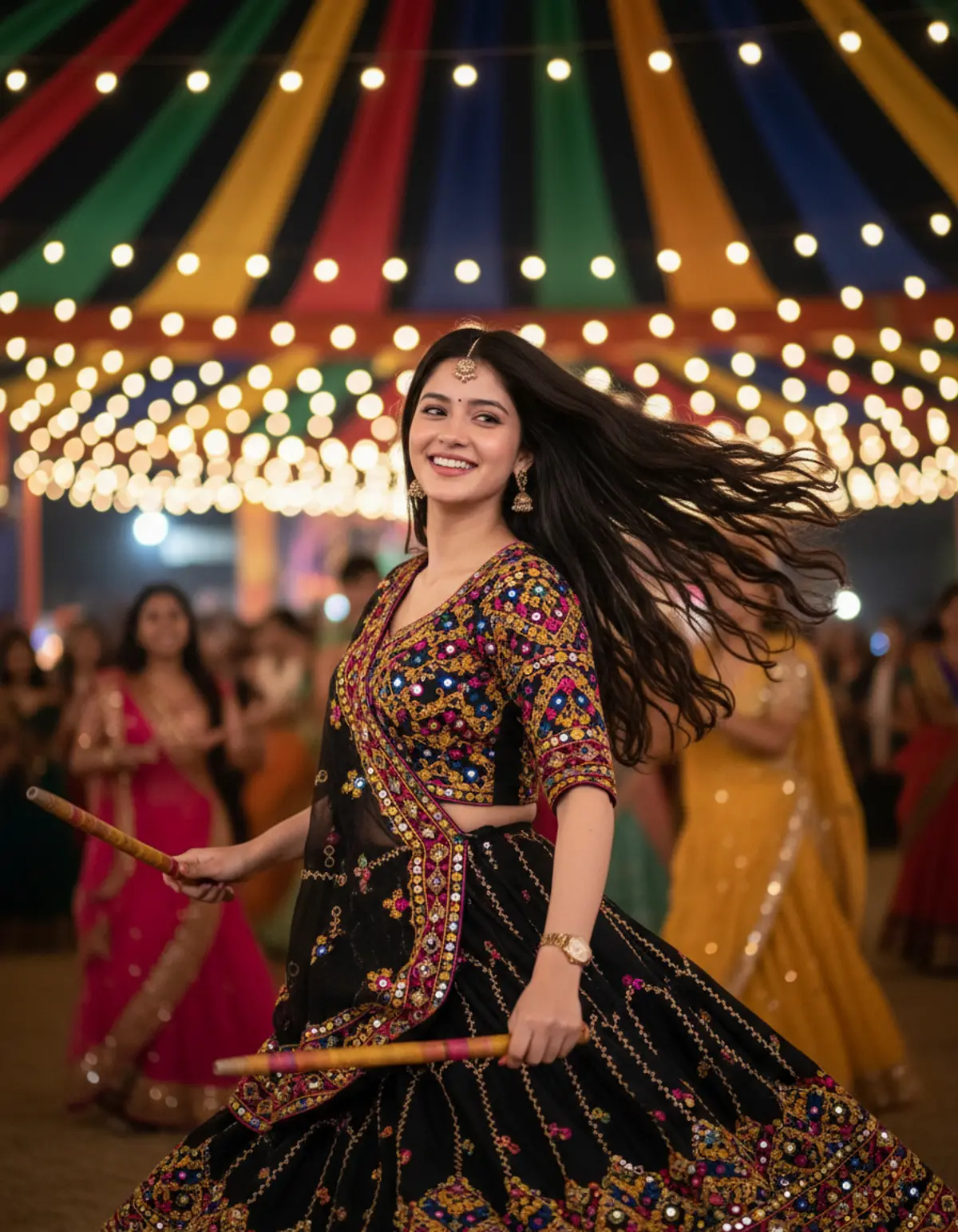
Dandiya Night
A dynamic festive portrait capturing a joyful Gujarati dancer mid-twirl in an ornate black Chaniya Choli, surrounded by colorful festival lights, energetic movement, and vibrant night-time bokeh.
Copy this, then paste it with your photo in Gemini or ChatGPT
ChatGPT opens with your prompt filled in. In Gemini, paste it. Add your photo there and send.ChatGPT opens with your prompt filled in. In Gemini, long-press the box, tap Paste. Add your photo.
Prompt
Needs 1 photo
Create image 9:16, Use reference IMG{ "category": "lifestyle_scene", "category_reasoning": "The image showcases a person actively participating in a cultural event, focusing on her interaction with the festive environment and props.", "adaptable": "subject", "subject": "A young woman mid-twirl, dancing with wooden Dandiya sticks.", "subject_details": "South Asian female, late teens to early twenties, long dark hair flying backward in motion, wide smile, wearing a traditional black Gujarati Chaniya Choli heavily embellished with multicolored thread embroidery and mirror work, gold watch on left wrist, small bindi.", "setting": "Outdoor night event, cultural festival or gathering.", "setting_details": "Blurred background showing other participants dancing in traditional attire, colorful fabric draped overhead, strings of warm spherical fairy lights.", "composition": "Medium shot, centered subject, dynamic diagonal lines created by the subject's flying hair and arms, extremely shallow depth of field isolating the subject from the busy background.", "camera": "Fast portrait prime lens, wide open aperture, high shutter speed to freeze motion, pronounced spherical bokeh.", "lighting": "Hard, front-right off-camera flash or strobe acting as the key light to freeze action, mixed with warm ambient practical lighting from the event.", "color_grade": "Vibrant, high-contrast night photography with high saturation.", "color_palette": "Deep black, bright yellow, magenta, vibrant blue, warm gold.", "style": "Candid event photography, cultural celebration, dynamic portraiture.", "mood": "Joyful, energetic, festive, euphoric.", "textures_materials": "Intricate embroidered fabric with reflective mirrors, smooth skin, flying hair strands, smooth wooden sticks.", "post_processing": "High clarity on the subject, boosted saturation, noise reduction on skin, digital sharpening.", "recreation_prompt": "A young South Asian woman mid-twirl dancing with wooden Dandiya sticks, long dark hair flying backward, wide smile looking off-camera left, wearing a traditional black Gujarati Chaniya Choli heavily embellished with multicolored embroidery and mirrors. Outdoor night festival setting, blurred crowd dancing in background, colorful tents, warm fairy lights. Medium shot, fast prime lens, shallow depth of field, large circular bokeh. Front-right strobe lighting freezing the action, warm ambient practicals. Vibrant high-contrast color grade, deep blacks, saturated reds and yellows, high-end candid event photography, crisp focus.", "adaptation_prompt": "[YOUR SUBJECT — describe yourself: appearance, outfit, pose] mid-twirl dancing with wooden Dandiya sticks, long hair flying backward, wide smile looking off-camera left. Outdoor night festival setting, blurred crowd dancing in background, colorful tents, warm fairy lights. Medium shot, fast prime lens, shallow depth of field, large circular bokeh. Front-right strobe lighting freezing the action, warm ambient practicals. Vibrant high-contrast color grade, deep blacks, saturated reds and yellows, high-end candid event photography, crisp focus.", "negative_prompt": "blurry subject, motion blur on face, dull colors, noisy shadows, underexposed, fake-looking lighting, distorted hands, messy background merging with subject.", "color_science": "High saturation, warm night event lighting with prominent yellow and gold hues, deep blacks, high-contrast flash lighting mixed with ambient tungsten practicals.", "filter_name": "Vibrant Event Flash Photography", "filter_description": "Boosted vibrance, sharp subject masking against blurred background, high localized contrast, smooth skin retouching, noise reduction.", "white_balance": "Tungsten/Warm event bias", "color_temperature": "Warm", "tone_curve": "S-curve with deep, crushed shadows and bright specular highlights", "dynamic_range": "Wide, retaining detail in the dark fabric while capturing bright string lights", "highlight_rendering": "Crisp, slightly blooming in the out-of-focus background lights to form bokeh balls", "shadow_rendering": "Deep but detailed, dropping to pure black in unlit areas of the heavy fabric", "camera_rendering": "High-resolution digital sensor, high ISO performance with clean output", "lens_rendering": "Fast portrait prime, pronounced circular bokeh, sharp center focus, rapid focus falloff", "noise_profile": "Very clean, heavily noise-reduced via post-processing", "grain_profile": "No visible film grain", "sharpness_profile": "Razor-sharp on the face, eyes, and front embroidery; natural focus falloff toward the back", "retouching_analysis": "Skin smoothing, subtle digital enhancement of eye whites and teeth, color dodging on the embroidery", "portrait_analysis": "Head turned to the left, dynamic action pose, natural looking teeth, relaxed but excited expression", "facial_expression": "Joyous, laughing, looking off-camera", "micro_expression": "Crinkled orbicularis oculi, wide mouth, engaged zygomatic major muscles", "skin_rendering": "Flawless, luminous under flash, slight specular highlights on nose and cheeks", "hair_rendering": "Dynamic motion, flying backwards, individual strands cleanly separated against the background", "lighting_analysis": "Front-right key flash freezing motion, warm ambient practical lights providing depth", "visual_style_analysis": "Professional event photography, high-end candid portraiture" }
How to use this prompt
In Gemini
- Tap Copy prompt, or Open in Gemini, which copies it for you.
- In Gemini, add your photo with the + button.
- Paste the prompt into the message box and send.
In ChatGPT
- Tap Open in ChatGPT: it opens with the prompt filled in (it is copied too, in case you need to paste it).
- Attach your photo with the + button.
- Send, and wait for your picture.
Gemini se kaise banaye: photo upload karo, prompt paste karo, send dabao.
Questions people ask
Is this prompt free?
Yes. Copy it and use it in Gemini, ChatGPT or another AI photo app as often as you like. You don't need a pixkoz account to copy it.
Will it work on my photo?
It works best with a clear, front-facing photo in good light, with the face fully visible. AI results vary from one try to the next: if a detail is off, try again.
Gemini or ChatGPT: which is better for this?
Both can use it. The examples on this page were made with Google: Nano Banana (Gemini 2.5 Flash Image), the model behind Gemini's images, so Gemini comes closest to them; ChatGPT gives its own take on the same prompt.
What happens to my photo?
When you use the prompt in Gemini or ChatGPT, your photo goes to that app, not to pixkoz, and that app's own privacy terms apply.