Open this in the pixkoz appGet the pixkoz app on Google PlayUse the pixkoz app
OpenGetOpen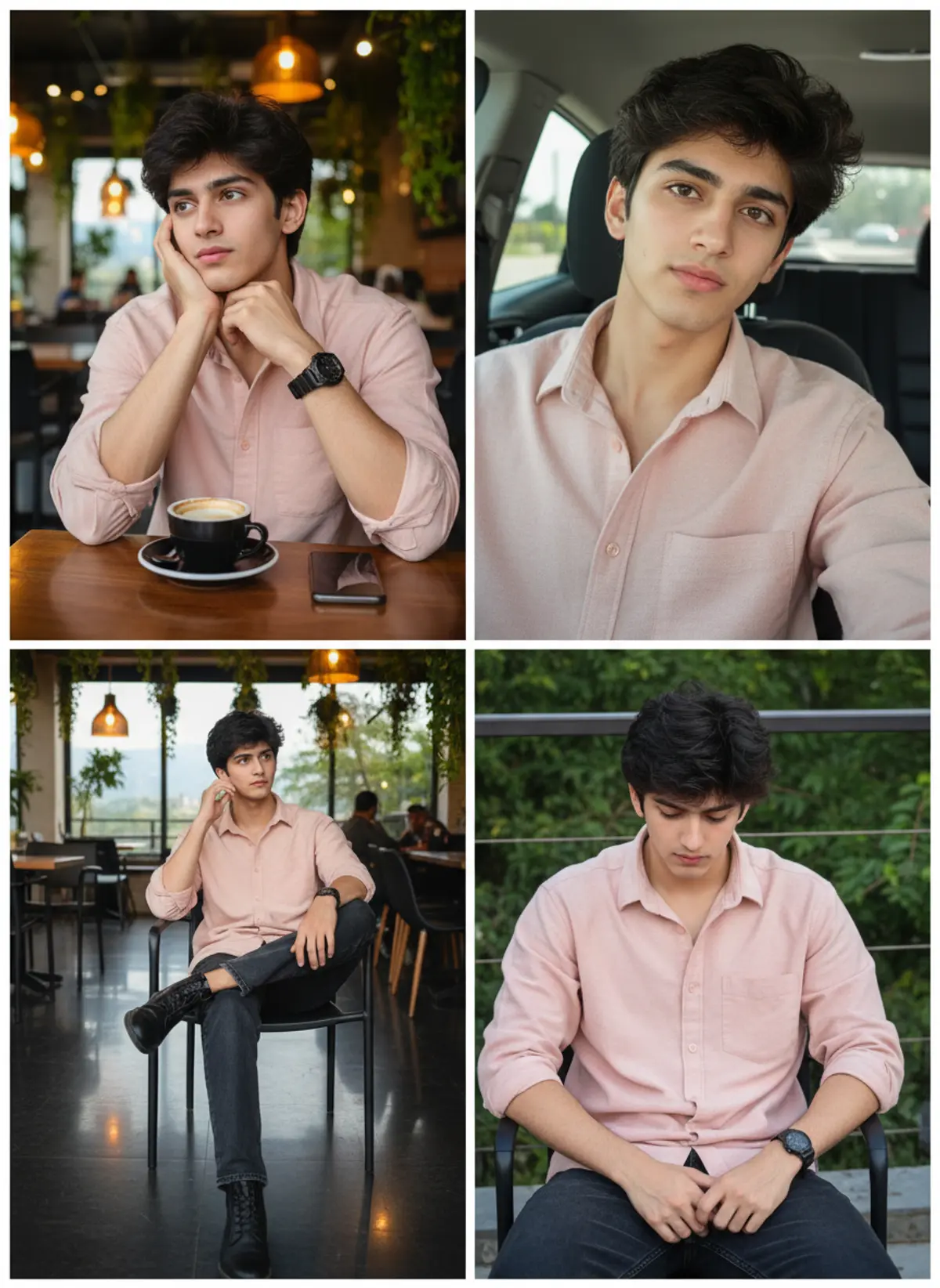
Premium Pink Shirt Cafe Lifestyle Collage
A photorealistic 2×2 lifestyle collage preserving the subject’s exact facial identity across four stylish cafe and car portraits, blending relaxed expressions, soft lighting, authentic textures, and premium Instagram aesthetics.
Copy this, then paste it with your photo in Gemini or ChatGPT
ChatGPT opens with your prompt filled in. In Gemini, paste it. Add your photo there and send.ChatGPT opens with your prompt filled in. In Gemini, long-press the box, tap Paste. Add your photo.
Prompt
Needs 1 photo
Use the uploaded reference image as the ONLY and EXCLUSIVE facial identity reference for the young Indian man. The uploaded reference image is the definitive source of his facial identity and must be followed with maximum possible identity fidelity. Preserve his exact recognizable facial appearance from the uploaded photo across all four panels, including exact face shape, facial proportions, forehead and hairline, eyebrows, eyes, eye shape and spacing, nose shape and proportions, lips and mouth shape, cheekbones, jawline, chin, ears, beard and moustache pattern, skin tone, natural facial asymmetry, distinctive facial characteristics, apparent age, and authentic skin texture. Do not reinterpret, redesign, beautify, idealize, genericize, or substitute his face. The same individual from the uploaded reference image must appear unmistakably as the same person in all four panels. Facial identity must remain consistent across every angle, expression, crop, lighting condition, and camera perspective. Do not create four similar-looking versions of a generic man; reproduce the uploaded subject's recognizable facial identity consistently in every panel. Do not use the uploaded image merely as loose inspiration. Directly preserve the man's facial identity from the uploaded reference image. Do not replace his face with another face, blend his identity with another person, transfer features from any generated face, or introduce an AI-generated generic male face. Do not alter his facial structure, reshape his jaw or chin, change his nose, enlarge or reduce his eyes, modify his lips, alter his cheekbones, change his forehead or hairline, change his beard/moustache characteristics, change his apparent age, or apply facial beautification that changes his recognizable identity. Preserve authentic facial details from the reference, including natural skin texture, pores, subtle imperfections, fine facial details, natural asymmetry, and individual characteristics. Avoid plastic-looking skin, excessive smoothing, face slimming, symmetry correction, artificial sharpening, beauty-filter effects, or painterly facial rendering. The face must remain naturally photographic and convincingly belong to the same person shown in the uploaded reference. Identity consistency has the highest priority: whenever the man's face is visible in any panel, match the uploaded reference image's facial identity rather than generating a new interpretation. Maintain identity even when the face is shown in profile, three-quarter view, direct view, slightly elevated camera angle, close-up, or under different lighting. Important separation rule: The uploaded reference image controls ONLY the subject's facial identity and recognizable facial appearance. Every other visual element—including hairstyle styling, clothing, poses, locations, environments, camera angles, lighting, composition, color, photographic treatment, accessories, and all four-panel details—must follow the original prompt exactly as written below. --- Ultra realistic photograph of a handsome young Indian man presented as a clean 2×2 four-panel lifestyle portrait collage, with the exact same person appearing consistently in all four panels. Use the uploaded reference image as the visual reference for his overall facial appearance, hairstyle, skin tone and natural proportions. Keep his facial identity, hairstyle, beard, skin texture and body proportions consistent across every panel. Face must look completely natural and ultra realistic with real skin texture, visible pores, subtle imperfections and authentic facial details. Panel 1 — Top Left: The young man is sitting at a wooden cafe table, wearing a soft light-pink oversized button-up shirt with the sleeves rolled to the elbows and dark jeans. He rests one side of his face naturally against his hand while looking thoughtfully toward the side. A black ceramic coffee cup and saucer are placed on the wooden table in front of him, with a smartphone beside it. He wears a metallic wristwatch. Behind him is a cozy modern cafe with warm hanging pendant lights, indoor plants, glass windows and softly blurred customers and furniture. Warm ambient cafe lighting creates a natural lifestyle atmosphere. Panel 2 — Top Right: The same young man is sitting inside a modern car, wearing the same light-pink shirt. Create a natural close-up selfie-style portrait from slightly above eye level. His thick messy black hair falls naturally across his forehead, with a subtle beard and moustache. He looks directly toward the camera with a calm, slightly serious expression. The black car seat, window, door frame and natural daylight outside are visible in the background. Keep realistic facial proportions and natural skin texture. Panel 3 — Bottom Left: The same man is seated comfortably on a modern cafe chair with one leg crossed over the other, wearing the same light-pink shirt, dark relaxed-fit jeans and black leather boots. His elbow rests naturally on the chair while one hand is near his face, looking toward the side with a thoughtful expression. The cafe interior contains glossy dark flooring, black chairs, warm pendant lights, wooden furniture and green hanging plants. Capture his full body naturally with realistic clothing folds and proportions. Panel 4 — Bottom Right: The same young man is sitting casually on a chair in an outdoor or semi-open cafe area, wearing the same light-pink shirt and dark jeans. He looks downward with a relaxed, introspective expression, his hands resting naturally together between his knees. His metallic wristwatch is clearly visible. Include realistic greenery, cafe railing, warm evening ambient light and subtle background details. The camera angle is slightly elevated, emphasizing his hairstyle and natural facial features. Arrange all four photographs into a seamless 2×2 collage, separated by thin clean white borders. Maintain the exact same face, hairstyle, clothing, watch and overall appearance across all four panels. The overall aesthetic should feel like a premium Instagram lifestyle photoshoot—soft, natural, youthful, stylish and authentic. Use realistic warm cafe lighting in the indoor scenes and soft natural daylight in the car portrait. Keep the entire scene sharp and richly detailed with a deep depth of field, preserving realistic environmental textures while maintaining natural photographic depth. Genuine DSLR photography, natural exposure and white balance, realistic skin tones, subtle cinematic warmth, authentic clothing textures, no artificial skin smoothing, no plastic skin, no distorted hands, no extra fingers, no duplicated facial features, no unnatural body proportions, no cartoon appearance, no excessive HDR. shot on Canon EOS R5 35mm lens, photorealistic --ar 2:3 FINAL IDENTITY VERIFICATION REQUIREMENT: Before rendering, verify that all four panels depict the same individual from the uploaded reference image. The facial structure, proportions, eyes, eyebrows, nose, lips, cheeks, jawline, chin, ears, beard/moustache characteristics, skin tone, natural asymmetry, and distinctive facial traits must remain recognizably consistent with the uploaded reference. If any generated facial feature conflicts with the uploaded reference identity, prioritize the uploaded facial identity. DO NOT CHANGE ANY OTHER DETAIL OF THE ORIGINAL PROMPT.
Part of: AI photo prompts for boys
How to use this prompt
In Gemini
- Tap Copy prompt, or Open in Gemini, which copies it for you.
- In Gemini, add your photo with the + button.
- Paste the prompt into the message box and send.
In ChatGPT
- Tap Open in ChatGPT: it opens with the prompt filled in (it is copied too, in case you need to paste it).
- Attach your photo with the + button.
- Send, and wait for your picture.
Gemini se kaise banaye: photo upload karo, prompt paste karo, send dabao.
Questions people ask
Is this prompt free?
Yes. Copy it and use it in Gemini, ChatGPT or another AI photo app as often as you like. You don't need a pixkoz account to copy it.
Will it work on my photo?
It works best with a clear, front-facing photo in good light, with the face fully visible. AI results vary from one try to the next: if a detail is off, try again.
Gemini or ChatGPT: which is better for this?
Both can use it. The examples on this page were made with Google: Nano Banana (Gemini 2.5 Flash Image), the model behind Gemini's images, so Gemini comes closest to them; ChatGPT gives its own take on the same prompt.
What happens to my photo?
When you use the prompt in Gemini or ChatGPT, your photo goes to that app, not to pixkoz, and that app's own privacy terms apply.





