Open this in the pixkoz appGet the pixkoz app on Google PlayUse the pixkoz app
OpenGetOpen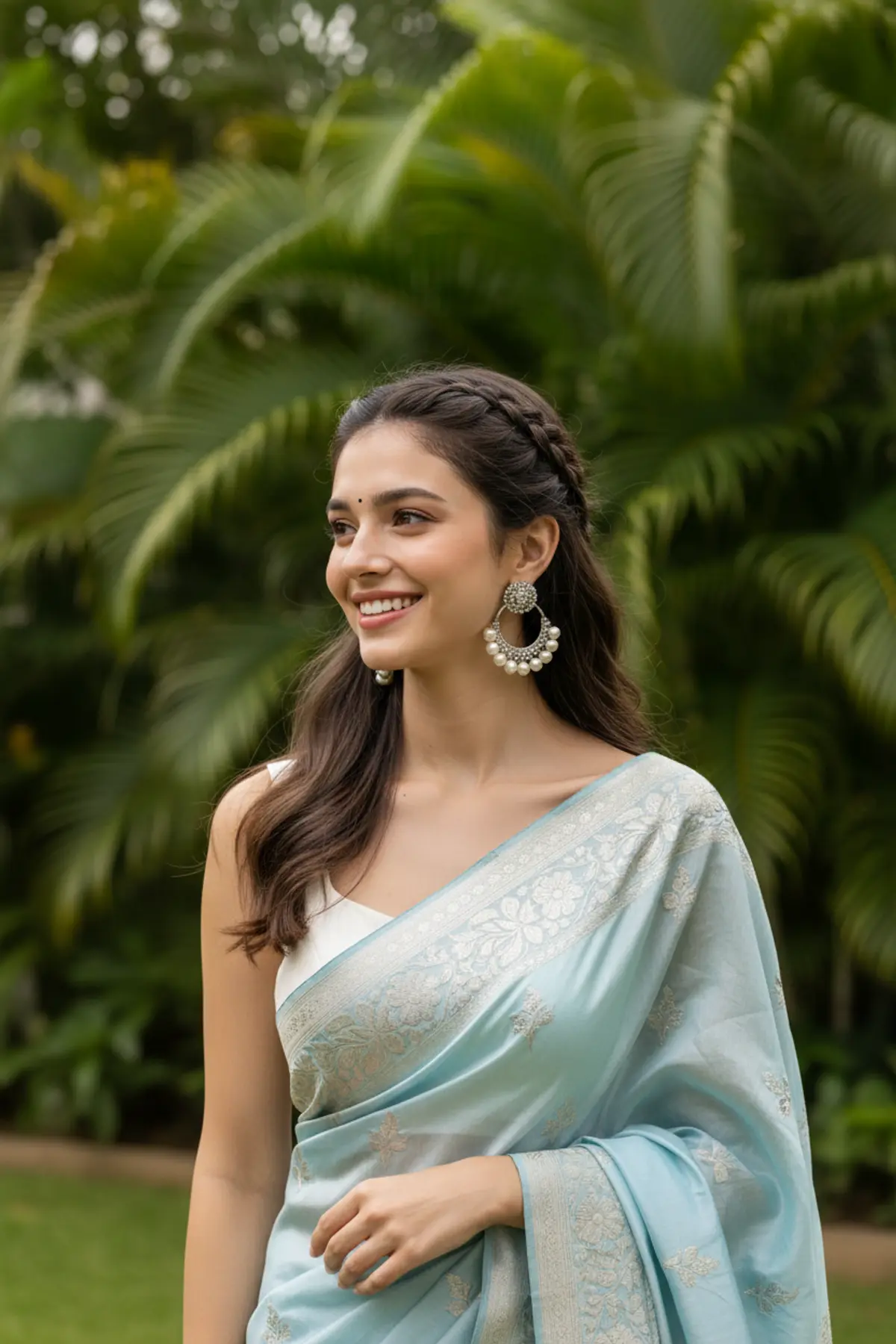
Light Blue Saree Editorial Portrait
A joyful contemporary Indian fashion portrait blending a delicate light blue embroidered saree, elegant silver pearl jewelry, tropical greenery, soft daylight, and polished editorial photography.
Copy this, then paste it with your photo in Gemini or ChatGPT
ChatGPT opens with your prompt filled in. In Gemini, paste it. Add your photo there and send.ChatGPT opens with your prompt filled in. In Gemini, long-press the box, tap Paste. Add your photo.
Prompt
Needs 1 photo
Create image 9:16, Use reference IMG { "category": "fashion_editorial", "category_reasoning": "Styled portrait highlighting traditional attire and jewelry.", "adaptable": "subject", "subject": "Woman smiling and looking off-camera left.", "subject_details": "Young adult, braided dark hair, large silver pearl earrings, light blue embroidered saree, white blouse.", "setting": "Outdoor tropical garden, daytime daylight.", "setting_details": "Green palm leaves, blurred natural foliage.", "composition": "Medium close-up, centered, eye-level, shallow depth.", "camera": "Portrait telephoto, shallow depth of field, smooth bokeh.", "lighting": "Soft diffused daylight, even facial fill, low contrast.", "color_grade": "Natural vivid, lifelike tones, clean whites.", "color_palette": "Light blue, white, vibrant green, warm skin tones.", "style": "Editorial fashion portrait, contemporary traditional.", "mood": "Joyful, serene.", "textures_materials": "Silk fabric, pearl beads, metallic embroidery, matte skin.", "post_processing": "Subtle skin retouching, color vibrancy boost, crisp eye sharpening.", "recreation_prompt": "fashion_editorial, woman smiling looking left, braided dark hair, silver pearl earrings, light blue embroidered saree, outdoor tropical garden, palm leaves, medium close-up, centered, telephoto, shallow depth, soft diffused daylight, natural vivid color, editorial portrait.", "adaptation_prompt": "fashion_editorial, [YOUR SUBJECT — describe yourself: appearance, outfit, pose], outdoor tropical garden, palm leaves, medium close-up, centered, telephoto, shallow depth, soft diffused daylight, natural vivid color, editorial portrait.", "negative_prompt": "harsh shadows, distorted face, cluttered background, oversaturated colors, artificial lighting.", "color_science": "Neutral daylight, warm skin preservation, vibrant foliage greens, clean pastel blues.", "filter_name": "Clean Editorial Portrait", "filter_description": "Natural saturation, balanced contrast, soft highlight rolloff.", "white_balance": "Neutral daylight.", "color_temperature": "Neutral-warm.", "tone_curve": "Standard S-curve, lifted midtones.", "dynamic_range": "High, retained highlight and shadow detail.", "highlight_rendering": "Soft, neutral white.", "shadow_rendering": "Soft, open, neutral.", "camera_rendering": "Modern digital sensor, high resolution.", "lens_rendering": "Telephoto compression, fast aperture, smooth background separation.", "noise_profile": "Clean, minimal digital noise.", "grain_profile": "None.", "sharpness_profile": "Sharp focus on eyes/jewelry, soft falloff.", "retouching_analysis": "Evens skin tone, enhanced eye clarity, flyaway hair removal.", "portrait_analysis": "Slight turn, upward gaze, natural Duchenne smile, balanced proportions.", "facial_expression": "Genuine joyful smile.", "micro_expression": "Relaxed brows, active cheek muscles, crinkled eye corners.", "skin_rendering": "Smooth, matte finish, soft natural texture.", "hair_rendering": "Textured front braids, soft flowing waves.", "lighting_analysis": "Diffused overhead soft light, broad facial fill, minimal shadow.", "visual_style_analysis": "High-end commercial portrait, lifestyle fashion." }
How to use this prompt
In Gemini
- Tap Copy prompt, or Open in Gemini, which copies it for you.
- In Gemini, add your photo with the + button.
- Paste the prompt into the message box and send.
In ChatGPT
- Tap Open in ChatGPT: it opens with the prompt filled in (it is copied too, in case you need to paste it).
- Attach your photo with the + button.
- Send, and wait for your picture.
Gemini se kaise banaye: photo upload karo, prompt paste karo, send dabao.
Questions people ask
Is this prompt free?
Yes. Copy it and use it in Gemini, ChatGPT or another AI photo app as often as you like. You don't need a pixkoz account to copy it.
Will it work on my photo?
It works best with a clear, front-facing photo in good light, with the face fully visible. AI results vary from one try to the next: if a detail is off, try again.
Gemini or ChatGPT: which is better for this?
Both can use it. The examples on this page were made with Google: Nano Banana (Gemini 2.5 Flash Image), the model behind Gemini's images, so Gemini comes closest to them; ChatGPT gives its own take on the same prompt.
What happens to my photo?
When you use the prompt in Gemini or ChatGPT, your photo goes to that app, not to pixkoz, and that app's own privacy terms apply.