Open this in the pixkoz appGet the pixkoz app on Google PlayUse the pixkoz app
OpenGetOpen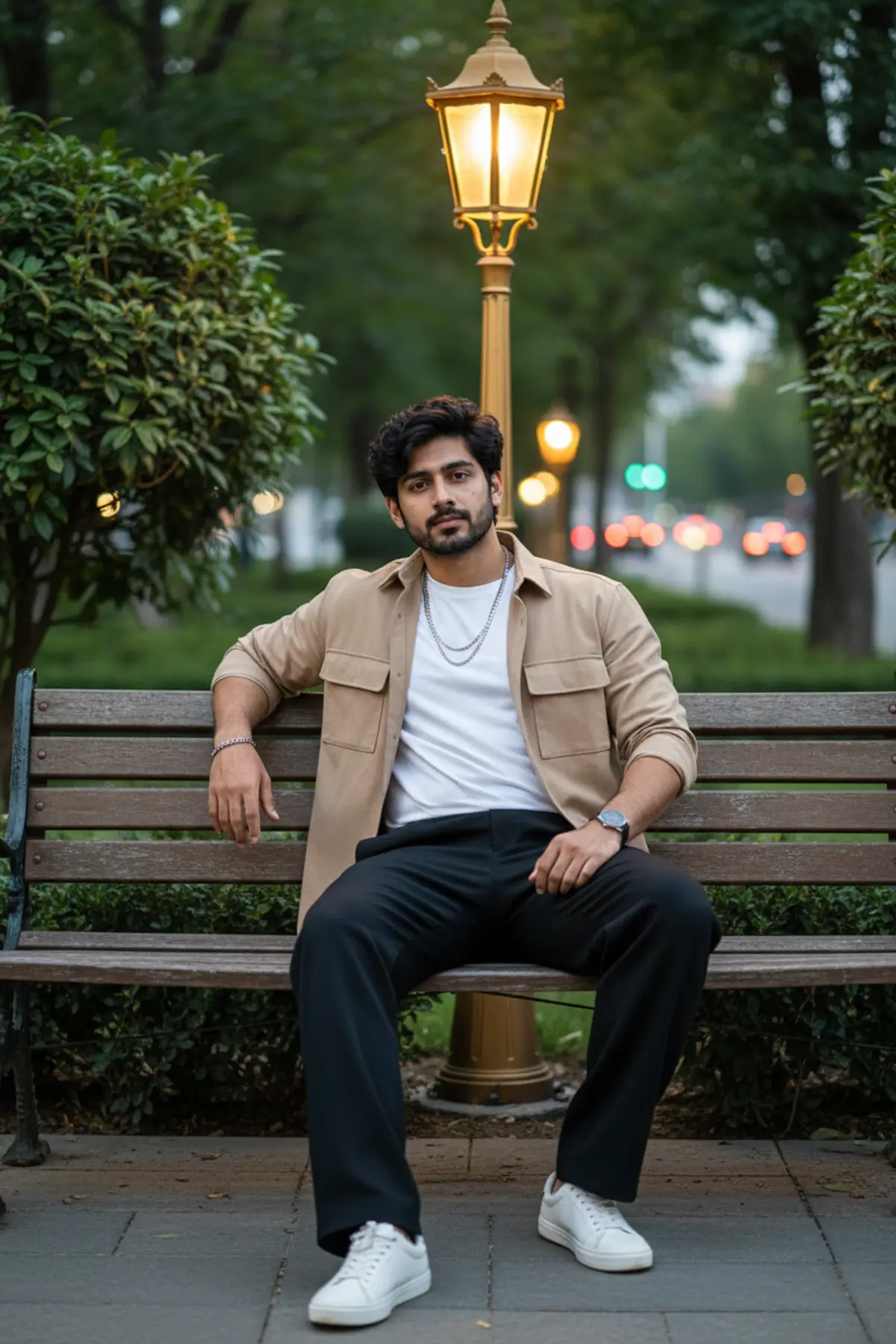

Cinematic Park Fashion Portrait
A sophisticated cinematic outdoor fashion portrait preserving the subject’s exact facial identity while showcasing relaxed luxury styling, warm vintage lamps, lush evening greenery, and moody blue-hour atmosphere.
Copy this, then paste it with your photo in Gemini or ChatGPT
ChatGPT opens with your prompt filled in. In Gemini, paste it. Add your photo there and send.ChatGPT opens with your prompt filled in. In Gemini, long-press the box, tap Paste. Add your photo.
Prompt
Needs 1 photo
Use the uploaded photo as the ONLY and EXCLUSIVE facial identity reference for the subject. The uploaded photo is the definitive source for the man's face and must be followed with maximum possible identity fidelity. Do not use a generic interpretation or generate a similar-looking person. STRICT FACIAL IDENTITY LOCK — ABSOLUTE HIGHEST PRIORITY Preserve the EXACT SAME PERSON shown in the uploaded reference photo. Match and retain precisely: - exact face shape and facial proportions - forehead shape and hairline - eyebrow shape, thickness, placement, and natural asymmetry - exact eye shape, size, spacing, eyelids, and natural eye characteristics - exact nose structure, bridge, tip, width, and proportions - exact lip shape, size, proportions, and natural smile characteristics - cheekbone structure and cheek proportions - jawline and chin shape - ears and their natural proportions - exact skin tone, complexion, and undertones - beard and moustache pattern, density, shape, length, and natural texture exactly as visible in the uploaded photo - distinctive facial marks, moles, lines, asymmetry, and other recognizable facial characteristics - natural age appearance - overall recognizable facial identity DO NOT change, replace, redesign, reinterpret, beautify, reshape, slim, widen, enlarge, reduce, smooth, de-age, age, or otherwise modify the face. DO NOT generate a generic AI face. DO NOT substitute another man's face. DO NOT blend the uploaded face with another face. DO NOT alter ethnicity or recognizable appearance. DO NOT apply beauty-filter changes to the facial structure. DO NOT artificially perfect facial symmetry. DO NOT remove distinctive facial characteristics or natural imperfections. Preserve authentic pores, fine skin texture, natural facial asymmetry, realistic facial anatomy, and all recognizable characteristics visible in the uploaded reference. The uploaded photo controls ONLY the subject's facial identity. Every other visual element must follow the original prompt exactly as written below. If any conflict occurs between generating a new face and preserving the uploaded identity, ALWAYS prioritize the uploaded facial identity. FINAL IDENTITY VERIFICATION: Before finalizing, compare the generated face against the uploaded reference photo and verify: - face shape matches - forehead and hairline match - eyebrows match - eyes and eye spacing match - nose structure matches - lips match - cheekbones match - jawline and chin match - skin tone matches - beard/stubble pattern matches - distinctive facial characteristics remain intact - natural asymmetry remains intact - no facial reshaping or beautification has occurred The final image must look like the EXACT SAME PERSON from the uploaded photo, not merely someone with similar features. DO NOT CHANGE ANY OTHER DETAIL OF THE ORIGINAL PROMPT. > Create an ultra-realistic, high-resolution cinematic outdoor fashion portrait based closely on the uploaded reference image. Preserve the subject’s facial identity, natural facial proportions, skin tone, hairstyle, eyebrows, eyes, nose, lips, jawline, beard/stubble pattern, and overall appearance with strict identity preservation. Hair & face: Thick naturally textured dark hair with soft curls/waves falling slightly over the forehead, neatly groomed short beard and moustache, realistic skin texture and natural masculine features. Outfit: Beige/tan relaxed-fit overshirt with two chest pockets, worn open over a plain white crew-neck T-shirt, loose black wide-leg trousers, clean white low-top sneakers, layered silver chain necklaces, a stylish wristwatch and subtle bracelet. Pose: Sitting casually on a wooden park bench, legs naturally apart, one arm relaxed along the backrest and the other resting naturally near the thigh. Calm, confident expression while looking directly toward the camera. Relaxed fashion-editorial posture. Background: Elegant lush garden/urban park during blue hour or early evening, dense green foliage, an ornate vintage golden street lamp directly behind the subject, additional warm glowing lamps in the distance, wooden bench and paved walkway, subtle city lights and traffic softly visible in the background. Lighting & atmosphere: Warm golden lamp light mixed with soft natural evening ambience, cinematic contrast, beautiful bokeh, realistic shadows, premium luxury fashion photography aesthetic, sophisticated and moody atmosphere. Camera: Full-body vertical composition, subject centered, eye-level camera angle, 50mm lens, shallow depth of field, realistic perspective, crisp subject with softly blurred background, natural color grading, detailed fabric and hair texture, photorealistic, ultra-detailed, 4K quality. Negative prompt: altered face, different identity, facial distortion, exaggerated features, plastic skin, excessive beauty retouching, different hairstyle, extra fingers, malformed hands, extra limbs, duplicated person, unnatural anatomy, CGI, cartoon, oversaturated colors, blurry subject, low resolution.
How to use this prompt
In Gemini
- Tap Copy prompt, or Open in Gemini, which copies it for you.
- In Gemini, add your photo with the + button.
- Paste the prompt into the message box and send.
In ChatGPT
- Tap Open in ChatGPT: it opens with the prompt filled in (it is copied too, in case you need to paste it).
- Attach your photo with the + button.
- Send, and wait for your picture.
Gemini se kaise banaye: photo upload karo, prompt paste karo, send dabao.
Questions people ask
Is this prompt free?
Yes. Copy it and use it in Gemini, ChatGPT or another AI photo app as often as you like. You don't need a pixkoz account to copy it.
Will it work on my photo?
It works best with a clear, front-facing photo in good light, with the face fully visible. AI results vary from one try to the next: if a detail is off, try again.
Gemini or ChatGPT: which is better for this?
Both can use it. The examples on this page were made with Google: Nano Banana (Gemini 2.5 Flash Image), the model behind Gemini's images, so Gemini comes closest to them; ChatGPT gives its own take on the same prompt.
What happens to my photo?
When you use the prompt in Gemini or ChatGPT, your photo goes to that app, not to pixkoz, and that app's own privacy terms apply.