Open this in the pixkoz appGet the pixkoz app on Google PlayUse the pixkoz app
OpenGetOpen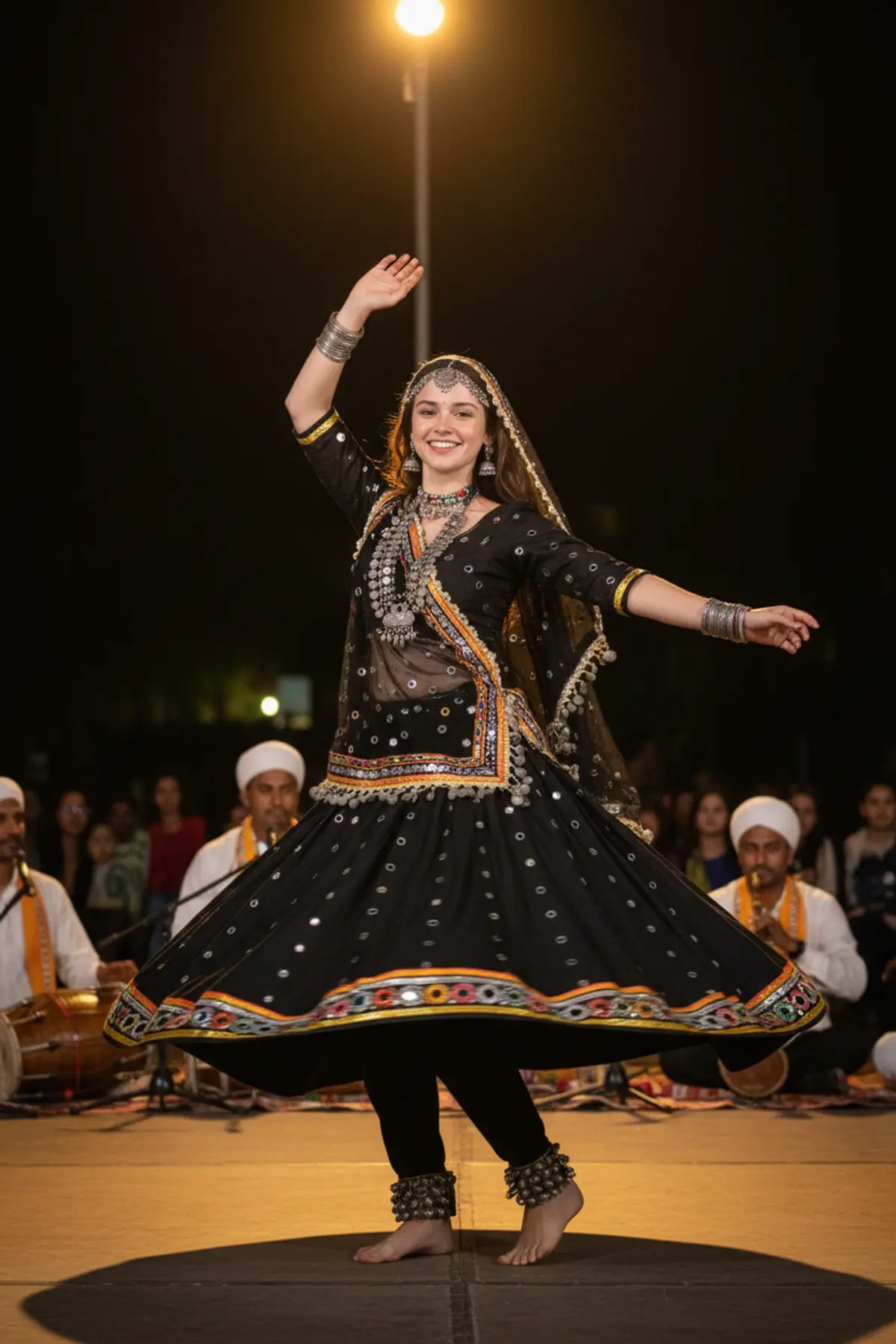
Kalbeliya Black Ghagra Twirl Portrait
Freezes you mid-twirl in a black mirror-work ghagra on a Rajasthani folk stage, with warm spotlights and musicians behind.
Copy this, then paste it with your photo in Gemini or ChatGPT
ChatGPT opens with your prompt filled in. In Gemini, paste it. Add your photo there and send.ChatGPT opens with your prompt filled in. In Gemini, long-press the box, tap Paste. Add your photo.
Prompt
Needs 1 photo
Keep the woman from the uploaded photo exactly as she is: same face, facial features, face shape, skin tone, hairstyle and hair colour. Do not beautify, slim, smooth or change her age; natural skin texture. Her face must be sharp, clearly visible and instantly recognisable. Outfit: a traditional Rajasthani folk-dance costume — a full black ghagra skirt with mirror work and bright multicoloured borders, a matching long-sleeved black blouse, a black odhni with small mirrors, and heavy silver tribal jewellery: necklace, large earrings, armlets and anklets. Scene: an open-air folk stage at night; behind her, softly blurred, sit folk musicians with a dholak and a been, and a small audience. Pose: frozen mid-twirl, the skirt flared out in a wide circle, one arm raised gracefully above her head, the other held out to the side, face turned towards the camera with a bright, joyful expression. Light and camera: a warm golden spotlight from above on her face and costume, glinting off the mirrors, dark warm background, fast shutter so the skirt and jewellery are crisp, 70mm lens, full-body framing. Mood: energetic, proud and celebratory. Photorealistic, no text, no watermark.
How to use this prompt
In Gemini
- Tap Copy prompt, or Open in Gemini, which copies it for you.
- In Gemini, add your photo with the + button.
- Paste the prompt into the message box and send.
In ChatGPT
- Tap Open in ChatGPT: it opens with the prompt filled in (it is copied too, in case you need to paste it).
- Attach your photo with the + button.
- Send, and wait for your picture.
Gemini se kaise banaye: photo upload karo, prompt paste karo, send dabao.
Questions people ask
Is this prompt free?
Yes. Copy it and use it in Gemini, ChatGPT or another AI photo app as often as you like. You don't need a pixkoz account to copy it.
Will it work on my photo?
It works best with a clear, front-facing photo in good light, with the face fully visible. AI results vary from one try to the next: if a detail is off, try again.
Gemini or ChatGPT: which is better for this?
Both can use it. The examples on this page were made with Google: Nano Banana (Gemini 2.5 Flash Image), the model behind Gemini's images, so Gemini comes closest to them; ChatGPT gives its own take on the same prompt.
What happens to my photo?
When you use the prompt in Gemini or ChatGPT, your photo goes to that app, not to pixkoz, and that app's own privacy terms apply.